Table of Contents
- Building REST API
- Microservices(V1)
- Microservices(V3)
- Ports and URLs
- Currency Config Repository
- Config Server Microservice
- Limits Microservice
- Currency Exchange
- Currency Conversion
- Eureka Naming Server
- Load Balancing with Eureka
- Spring Cloud API Gateway
- Circuit Breaker- Resilience4j
- Observability and OpenTelemetry
- Zipkin - Distributed Tracing
- Docker - Container Orchestration
- Logging - ELK Stack
- Kubernetes
- #TODO
Tech Stack :











**Definition : ** Software system designed to support interoperable machine-to-machine interaction over a network.
-
3 Keys of Web Service
-
Designed for machine-to-machine (or application-to-application) interaction
-
Should be interoperable - Not platform dependent. As it shouldn't matter which language our web service made i.e. Java, PHP, .Net etc.
-
Should allow communication over a network
-
-
How does data exchange between applications take place?
- By Request and Response
-
How can we make web services platform independent?
- There are 2 popular formats widely accepted by most of frontend and backend languages - XML and JSON
Transport - It defines how a service is called.
-
HTTP - It is the service exposed over the internet.
-
MQ - Message Queue (e.g. WebSphere MQ) is the service exposed over a queue. Here Service requestor place a message in queue, Service Provider listening on the queue and as soon as there is a request on the queue, it would take the request, do the processing of it, create the response and put it back into the queue.


Web Service Groups : There are 2 types of web services -
-
SOAP (Simple Object Access Protocol)
-
REST (Representational State Transfer)
-
SOAP (Simple Object Access Protocol)
- Format - SOAP XML Request - SOAP XML Response
- Transport : MQ or HTTP , There is no restriction.
- Service Definition : WSDL (Web Services Description Language)

SOAP Example Request / Response :
<SOAP-ENV:Envelope xmlns:SOAPENV="http://schemas.xmlsoap.org/soap/envelope/">
    <SOAP-ENV:Header/>
    <SOAP-ENV:Body>
        <ns2:getCourseDetailsResponse xmlns:ns2="http://in28minutes.com/courses">
            <ns2:course>
                <ns2:id>Course1</ns2:id>
                <ns2:name>Spring</ns2:name>
                <ns2:description>10 Steps</ns2:description>
            </ns2:course>
        </ns2:getCourseDetailsResponse>
    </SOAP-ENV:Body>
</SOAP-ENV:Envelope>
-
REST (Representational State Transfer)
- Data Exchange Format - No Restriction. JSON is popular
- Transport : Only HTTP
- Service Definition : No Standard. WADL/Swagger/…

- HOW to build a great REST API?
- Identifying Resources (/users, /users/{id}/posts)
- Identifying Actions (GET, POST, PUT, DELETE, ...)
- Defining Request and Response structures
- Using appropriate Response Status (200, 404, 500, ..)
- Understanding REST API Best Practices
- Thinking from the perspective of your consumer
- Validation, Internationalization - i18n, Exception Handling, HATEOAS, Versioning, Documentation, Content Negotiation and a lot more!
What's Happening in the Background?
Let's explore some Spring Boot Magic: Enable Debug Logging. WARNING: Log change frequently!
-
How are our requests handled?
- DispatcherServlet - Front Controller Pattern
- Mapping servlets: dispatcherServlet urls=[/]
- Auto Configuration (DispatcherServletAutoConfiguration)
- DispatcherServlet - Front Controller Pattern
-
How does HelloWorldBean object get converted to JSON?
- @ResponseBody + JacksonHttpMessageConverters
- Auto Configuration (JacksonHttpMessageConvertersConfiguration)
-
Who is configuring error mapping?
- Auto Configuration (ErrorMvcAutoConfiguration)
-
How are all jars available(Spring, Spring MVC, Jackson, Tomcat)?
- Starter Projects - Spring Boot Starter Web (spring-webmvc, spring-web, springboot-starter-tomcat, spring-boot-starter-json)
- Documentation - Swagger
- Content Negotiation (What if consumer expect a XML response back ? )
- Internationalization - i18n (How to customize API response according to language of user throughout the world ? )
- Versioning
- HATEOAS
- Static Filtering
- Dynamic Filtering
- Monitoring
We need to use springdoc-openapi version 2+ for Spring Boot 3 and JDK17.
<dependency>
	<groupId>org.springdoc</groupId>
	<artifactId>springdoc-openapi-starter-webmvc-ui</artifactId>
	<version>2.0.0</version>
</dependency>-
Same Resource - Same URI
-
HOWEVER Different Representations are possible
- Example: Different Content Type - XML or JSON (Accept header (MIME types - application/xml, application/json, ...)
- Example: Different Language - English or Dutch or french (Accept-Language header (en, nl, fr, ..))
Steps of Content Negotiation
-
STEP 1: add this in pom.xml
<!-- https://mvnrepository.com/artifact/com.fasterxml.jackson.dataformat/jackson-dataformat-xml -->
<dependency>
    <groupId>com.fasterxml.jackson.dataformat</groupId>
    <artifactId>jackson-dataformat-xml</artifactId>
</dependency>
-
STEP 2: Add
Acceptheader in postman forapplication/xml. If we don't provide this header, default isapplication/jsoncurl --location 'http://localhost:8080/users' \ --header 'Accept: application/xml'
Typically HTTP Request Header - Accept-Language is used. Accept-Language - indicates natural language and locale
that the consumer prefers
- Example: en - English (Good Morning)
- Example: nl - Dutch (Goedemorgen)
- Example: fr - French (Bonjour)
- Example: de - Deutsch (Guten Morgen)
- URI Versioning - Twitter
- Request Parameter versioning - Amazon
- (Custom) headers versioning - Microsoft
- SAME-URL headers=[X-API-VERSION=1]
- SAME-URL headers=[X-API-VERSION=2]
- Media type versioning (a.k.a “content negotiation” or “accept header”) - GitHub
-
SAME-URL produces=application/vnd.company.app-v1+json
-
SAME-URL produces=application/vnd.company.app-v2+json
-
Factors to consider
- URI Pollution
- Misuse of HTTP Headers
- Caching
- Can we execute the request on the browser?
- API Documentation
- Summary: No Perfect Solution
-
Recommendations
- Think about versioning even before you need it!
- One Enterprise - One Versioning Approach
-
Websites allow you to: See Data AND Perform Actions (using links)
-
How about enhancing your REST API to tell consumers how to perform subsequent actions?
-
HATEOAS (In below image,
_linkssection coming fromhateoas)
-
-
Implementation Options:
- 1: Custom Format and Implementation
- Difficult to maintain
- 2: Use Standard Implementation
- HAL (JSON Hypertext Application Language): Simple format that gives a consistent and easy way to hyperlink between resources in your API
- Spring HATEOAS: Generate HAL responses with hyperlinks to resources
-
Steps :
-
STEP 1: pom.xml
<dependency>
    <groupId>org.springframework.boot</groupId>
    <artifactId>spring-boot-starter-hateoas</artifactId>
</dependency>
-
STEP 2: UserResource.java : Here we have added
all-userslink section of response which is of generic typehateoas.Resourceimport static org.springframework.hateoas.mvc.ControllerLinkBuilder.linkTo; import static org.springframework.hateoas.mvc.ControllerLinkBuilder.methodOn; import org.springframework.hateoas.Resource; import org.springframework.hateoas.mvc.ControllerLinkBuilder; ... @RestController public class UserResource { @GetMapping("/users/{id}") public Resource<User> retrieveUser(@PathVariable int id) { User user = service.findOne(id); if(user==null)throw new UserNotFoundException("id-"+ id); //"all-users", SERVER_PATH + "/users" //retrieveAllUsers Resource<User> resource = new Resource<User>(user); ControllerLinkBuilder linkTo = linkTo(methodOn(this.getClass()).retrieveAllUsers()); resource.add(linkTo.withRel("all-users")); //HATEOAS return resource; } @PostMapping("/users") public ResponseEntity<Object> createUser(@Valid @RequestBody User user) { User savedUser = service.save(user); // CREATED // /user/{id} savedUser.getId() URI location = ServletUriComponentsBuilder .fromCurrentRequest() .path("/{id}") .buildAndExpand(savedUser.getId()).toUri(); return ResponseEntity.created(location).build(); } }
-

- An API explorer for RESTful Hypermedia APIs using HAL
- Enable your non-technical teams to play with APIs
- Spring Boot HAL Explorer
- Auto-configures HAL Explorer for Spring Boot Projects
- Import in pom.xml using
spring-data-rest-hal-explorer

This is a older version compatible with Spring boot < 2.3.0, For newer Versions, Please refer []
Problems and Solutions for each problem :
- CENTRALIZED CONFIGURATION MANAGEMENT - Spring Cloud Config Server
- LOCATION TRANSPARANCY - Naming Server (Eureka)
- LOAD BALANCING - Ribbon (Client Side)
- VISIBILITY AND MONITORING -
- Zipkin Distributed Tracing
- Netflix API Gateway
- FAULT TOLERANCE - Hystrix
Problems and Solutions for each problem :
- CENTRALIZED CONFIGURATION MANAGEMENT - Spring Cloud Config Server
- LOCATION TRANSPARANCY - Naming Server (Eureka)
- LOAD BALANCING - Spring Cloud Load-balancer instead of Ribbon (Client Side)
- VISIBILITY AND MONITORING -
- Zipkin Distributed Tracing
- Spring Cloud Gateway instead of Netflix Zuul API Gateway
- FAULT TOLERANCE - Resilience4j instead of Hystrix
- OpenTelemetry : One Standard - Logs, Traces & Metrics
- Micrometer (Replaces Spring Cloud Sleuth)

| Application | Port |
|---|---|
| Limits Service | 8080, 8081, ... |
| Spring Cloud Config Server | 8888 |
| Currency Exchange Service | 8000, 8001, 8002, .. |
| Currency Conversion Service | 8100, 8101, 8102, ... |
| Netflix Eureka Naming Server | 8761 |
| Spring Cloud API Gateway | 8765 |
| Zipkin Distributed Tracing Server | 9411 |
| Service | URL | Username | Password |
|---|---|---|---|
| Jenkins | https://swarnadeep.centralindia.cloudapp.azure.com/ | swarnadeep | swarnadeep |
| Tomcat | https://swarnadeep.centralindia.cloudapp.azure.com/tomcat/ | swarnadeep | swarnadeep |
| Sonarqube | https://swarnadeep.centralindia.cloudapp.azure.com/sonar/ | swarnadeep or admin |
Password@123 |
| Supervisor - Monitoring | https://swarnadeep.centralindia.cloudapp.azure.com/monitor/ | swarnadeep | swarnadeep |

-
File name pattern :
<microservice-name>-<profile>.properties -
Spring Cloud Config Repository is having highest priority. That means, if someone write same property within project and also he is fetching that property value from Git repo, then the property of git repo will overwrite the property value present in microservice property file.
-
STEP 1: Create property files
-
limits-service.properties
limits.service.minimum=4
limits.service.maximum=996
-
limits-service-dev.properties
limits.service.minimum=5
limits.service.maximum=995
-
limits-service-qa.properties
limits.service.minimum=6
limits.service.maximum=994
-
-
STEP 2: Initialize a git repository and push changes into master branch
-
$ git init
$ git add .
$ git commit -m "added files"
-
If its a remote branch , then we need to create api key from : Github > Settings > Developer Settings
-
-
Connecting with Git Repo :
-
STEP 1 : Import downloaded Zip from start.spring.io and add
@EnableConfigServerannotation in main class : ConfigServerApplication.javaimport org.springframework.cloud.config.server.EnableConfigServer; @EnableConfigServer @SpringBootApplication public class ConfigServerApplication { public static void main(String[] args) { SpringApplication.run(ConfigServerApplication.class, args); } }
-
STEP 2: application.properties
spring.application.name=config-server
server.port=8888

#Sample URI for local git repo in Windows local system
#spring.cloud.config.server.git.uri=file:///D:/Microservices/config-repo

#Sample URI for Git repo from Github
spring.cloud.config.server.git.uri=https://github.com/SwarnadeepGhosh/currency-config-repo
spring.cloud.config.server.git.default-label=master
spring.cloud.config.server.git.username=SwarnadeepGhosh
spring.cloud.config.server.git.password=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
#spring.cloud.config.server.git.ignore-local-ssh-settings=true
#spring.cloud.config.server.git.private-key=<private-key>
-
STEP 3: Fetch Config using GET api calls :
-
-
Connecting with Config server and eventually fetching config from config repo :
-
STEP 1 : Import downloaded Zip from start.spring.io and add below in application.properties
spring.application.name=limits-service
spring.config.import=optional:configserver:http://localhost:8888

spring.profiles.active=dev
spring.cloud.profiles.active=dev
-
STEP 2: PropertyConfig.java - This will fetch data from property files, so that we can use it in application.
@ConfigurationProperties("limits.service")
@Component
@Data
public class PropertyConfig {
    private int minimum;
    private int maximum;
}
-
STEP 3: LimitController.java - This will fetch data from property files, so that we can use it in application.
@RestController
public class LimitController {

    @Autowired
    PropertyConfig propertyConfig;

    @GetMapping("/limits")
    public Limits retrieveLimits(){
        return new Limits(propertyConfig.getMinimum(), propertyConfig.getMaximum());
    }
}
-
STEP 3: Fetch response using GET api calls : http://localhost:8080/limits . Here property coming from git repo to config server and to limit service.
-
-
URLs
-
Service Working example :
-
If you ask it the value of 1 USD in INR, or 1 Australian Dollar in INR, the Currency Exchange Service answers
- 1 USD is 60 INR
- 1 Australian Dollars is 50 INR.
GET : http://localhost:8000/currency-exchange/from/EUR/to/INR
{
  "id": 10002,
  "from": "EUR",
  "to": "INR",
  "conversionMultiple": 75.00,
  "exchangeEnvironmentInfo": "37f1ad927c6e v1 27c6e"
}
-
-
application.properties
spring.application.name=currency-exchange
server.port=8000

spring.jpa.show-sql=true
spring.datasource.url=jdbc:h2:mem:testdb
spring.jpa.defer-datasource-initialization=true
spring.h2.console.enabled=true

spring.config.import=optional:configserver:

spring.devtools.restart.poll-interval=2s
spring.devtools.restart.quiet-period=1s
spring.devtools.livereload.port=35731
-
URLs
-
Service Working example :
-
Currency Conversion Service is used to convert a bucket of currencies. If you want to find the value of 10 USD, Currency Conversion Service returns 600.
- STEP 1 : Currency Conversion Service calls the Currency Exchange Service for the value of 1 USD. It gets a response back saying 60.
- STEP 2 : The Currency Conversion Service then multiplies 10 by 60, and returns 600 back.
GET : http://localhost:8100/currency-conversion/from/EUR/to/INR/quantity/10
{
  "id": 10002,
  "from": "EUR",
  "to": "INR",
  "conversionMultiple": 75.00,
  "quantity": 10,
  "totalCalculatedAmount": 750.00,
  "exchangeEnvironmentInfo": "37f1ad927c6e v1 27c6e",
  "conversionEnvironmentInfo": "fb6316b5713d v1 5713d"
}
-
-
Most easiest Rest Template call
-
application.properties
spring.application.name=currency-conversion
server.port=8100

spring.config.import=optional:configserver:
currency-exchange.url=http://localhost:8000

spring.devtools.restart.poll-interval=2s
spring.devtools.restart.quiet-period=1s
spring.devtools.livereload.port=35730
-
Main Interface to make Feign Client Calls : CurrencyExchangeProxy.java
import org.springframework.cloud.openfeign.FeignClient;
import org.springframework.web.bind.annotation.GetMapping;
import org.springframework.web.bind.annotation.PathVariable;

@FeignClient(name = "currency-exchange", url = "${currency-exchange.url}")
public interface CurrencyExchangeProxy {

    @GetMapping("/currency-exchange/from/{from}/to/{to}")
    public CurrencyConversion retrieveExchangeValue(
            @PathVariable String from,
            @PathVariable String to);
}
-
CurrencyConversionController.java
@RestController
public class CurrencyConversionController {

    @Autowired
    private CurrencyExchangeProxy proxy;

    @GetMapping("/currency-conversion/from/{from}/to/{to}/quantity/{quantity}")
    public CurrencyConversion calculateCurrencyConversionFeign(
        @PathVariable String from,
        @PathVariable String to,
        @PathVariable BigDecimal quantity
    ) {

        CurrencyConversion currencyConversion = proxy.retrieveExchangeValue(from, to);

        return CurrencyConversion.builder()
            .id(currencyConversion.getId())
            .from(currencyConversion.getFrom())
            .to(currencyConversion.getTo())
            .quantity(quantity)
            .conversionMultiple(currencyConversion.getConversionMultiple())
            .totalCalculatedAmount(quantity.multiply(currencyConversion.getConversionMultiple()))
            .environment(currencyConversion.getEnvironment() + " feign")
            .build();
    }
}

-
Also called Service Registry
-
URLs
-
Setting up Eureka Naming Server:
-
application.properties
spring.application.name=naming-server
server.port=8761

# We don't want this specific server to be registered with itself
eureka.client.register-with-eureka=false
eureka.client.fetch-registry=false
-
NamingServerApplication.java
import org.springframework.cloud.netflix.eureka.server.EnableEurekaServer;

@EnableEurekaServer
@SpringBootApplication
public class NamingServerApplication {

	public static void main(String[] args) {
		SpringApplication.run(NamingServerApplication.class, args);
	}
}
-
-
Registering other microservices with Eureka Naming Server :
-
pom.xml - add this dependency.
<dependency>
    <groupId>org.springframework.cloud</groupId>
    <artifactId>spring-cloud-starter-netflix-eureka-client</artifactId>
</dependency>
-
application.properties
# Eureka
eureka.client.serviceUrl.defaultZone=http://localhost:8761/eureka
eureka.instance.prefer-ip-address=true
# eureka.instance.hostname=localhost

# Actuator
management.endpoints.web.exposure.include=*
-
-
Final Eureka Console Snapshot: (Notice the Registered Instances list)


-
Here we will run multiple instances of Currency Exchange and load balance them from Currency-Conversion using Feign, Eureka Naming Server and Spring Cloud Load balancer.
-
Spring Cloud Load balancer comes along with Eureka Naming Server dependency.
-
We will remove the hardcoded url from Feign client : CurrencyExchangeProxy.java of Currency-Conversion
//@FeignClient(name = "currency-exchange", url = "${currency-exchange.url}")
@FeignClient(name = "currency-exchange")
public interface CurrencyExchangeProxy {

    @GetMapping("/currency-exchange/from/{from}/to/{to}")
    public CurrencyConversion retrieveExchangeValue(
            @PathVariable String from,
            @PathVariable String to);
}
- By doing this, Feign Client will
- Talk to Eureka
- Pickup the current running instances of currency-exchange
- Do the load balancing between them automatically.
- All these magic happens just by removing hardcoded url from Feign Client.
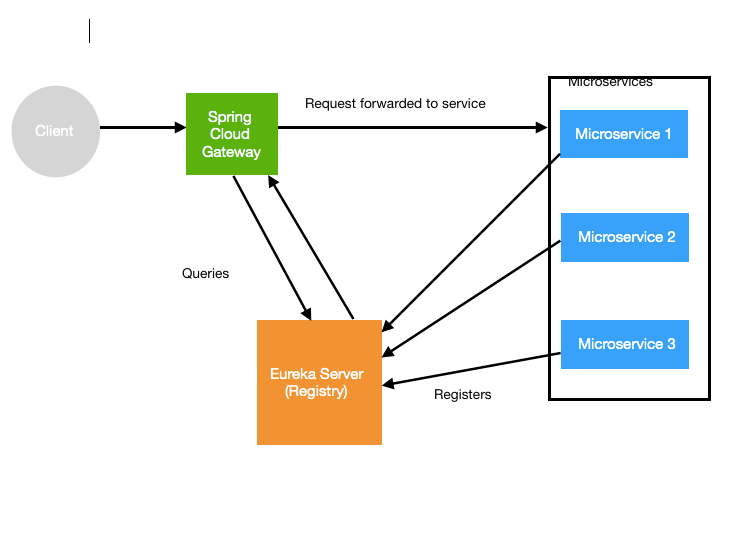
-
URLs
-
Simple, yet effective way to route to APIs
-
Provide cross cutting concerns:
- Security
- Monitoring/metrics
-
Built on top of Spring WebFlux (Reactive Approach)
-
Features:
- Match routes on any request attribute
- Define Predicates and Filters
- Integrates with Spring Cloud Discovery Client (Load Balancing) - Eureka
- Path Rewriting
-
pom.xml - If
spring-cloud-starter-gateway-mvcadded into pom, then change it tospring-cloud-starter-gateway, unless you will face unnecessary errors.<dependency> <groupId>org.springframework.cloud</groupId> <artifactId>spring-cloud-starter-gateway</artifactId> </dependency>
-
application.properties - Here we only mention eureka url and we need to enable discovery locator to true, so that Spring Cloud API Gateway will automatically pickup services which are registered in Eureka Naming Server. Also we are telling api gateway to use lowercase only as service id.
spring.application.name=api-gateway
server.port=8765

eureka.client.serviceUrl.defaultZone=http://localhost:8761/eureka
eureka.instance.prefer-ip-address=true
# eureka.instance.hostname=localhost

spring.cloud.gateway.discovery.locator.enabled=true
spring.cloud.gateway.discovery.locator.lowerCaseServiceId=true
#spring.cloud.gateway.discovery.locator.lower-case-service-id=true
#spring.cloud.gateway.httpserver.wiretap=true
#spring.cloud.gateway.httpclient.wiretap=true

# Actuator
management.endpoints.web.exposure.include=*
-
Testing URLS :
-
Points to Note : if we make 2 instances up of
currency-exchangefor e.g. on port 8000 and 8001, then on hitting these gateway testing urls, will automatically load balanced. I tried with http://localhost:8765/currency-conversion/currency-conversion/from/USD/to/INR/quantity/10 and it sometimes returns data from port 8000 server and sometimes from port 8001 server.{ "id": 10001, "from": "USD", "to": "INR", "quantity": 10, "conversionMultiple": 65, "totalCalculatedAmount": 650, "environment": "8000 feign" }{ "id": 10001, "from": "USD", "to": "INR", "quantity": 10, "conversionMultiple": 65, "totalCalculatedAmount": 650, "environment": "8001 feign" } -
Eureka Console after turning up below 4 microservices :
- API GATEWAY on port 8765
- Currency Exchange on port 8000 and 8001
- Currency Conversion on port 8100

-
ApiGatewayConfiguration.java - Here we only mention eureka url and we need to enable discovery locator to true, so that Spring Cloud API Gateway will automatically pickup services which are registered in Eureka Naming Server. Also we are telling api gateway to use lowercase only as service id.
@Configuration
public class ApiGatewayConfiguration {

    @Bean
    public RouteLocator gatewayRouter(RouteLocatorBuilder builder) {
//       Using filters, we can add Request and Response headers and parameters to any requests or response
        return builder.routes()
                .route(p -> p
                        .path("/get") // Example
                        .filters(f -> f
                                .addRequestHeader("MyHeader", "Swarna-header")
                                .addRequestParameter("Param", "Swarna-param"))
                        .uri("http://httpbin.org:80"))
                .route(p -> p.path("/currency-exchange/**")
                        .uri("lb://currency-exchange"))
                .route(p -> p.path("/currency-conversion/**")
                        .uri("lb://currency-conversion"))
                .route(p -> p.path("/currency-conversion-feign/**")
                        .uri("lb://currency-conversion"))
                .route(p -> p.path("/currency-conversion-new/**")
                        .filters(f -> f.rewritePath(
                                "/currency-conversion-new/(?<segment>.*)",
                                "/currency-conversion/${segment}"))
                        .uri("lb://currency-conversion"))
                .build();
    }
}
-
Testing URLS :
-
Custom Forwarding : http://localhost:8765/currency-exchange/from/USD/to/INR
-
Custom Forwarding : http://localhost:8765/currency-conversion/from/USD/to/INR/quantity/10
-
Path Rewriting : http://localhost:8765/currency-conversion-feign/from/USD/to/INR/quantity/10
-
Path Rewriting : http://localhost:8765/currency-conversion-new/from/USD/to/INR/quantity/10
-
Header and Parameter Injection : http://localhost:8765/get
-
Response : Original response is coming from http://httpbin.org:80, but here we are injecting
"Param": "Swarna-param"and"Myheader": "Swarna-header",{ "args": { "Param": "Swarna-param" }, "headers": { "Accept": "text/html,application/xhtml+xml,application/xml;q=0.9,image/avif,image/webp,image/apng,*/*;q=0.8,application/signed-exchange;v=b3;q=0.7", "Accept-Encoding": "gzip, deflate, br, zstd", "Accept-Language": "en-US,en;q=0.9,bn;q=0.8", "Cache-Control": "max-age=0", "Content-Length": "0", "Cookie": "ext_name=ojplmecpdpgccookcobabopnaifgidhf", "Forwarded": "proto=http;host=\"localhost:8765\";for=\"[0:0:0:0:0:0:0:1]:53507\"", "Host": "httpbin.org", "Myheader": "Swarna-header", "Sec-Ch-Ua": "\"Google Chrome\";v=\"123\", \"Not:A-Brand\";v=\"8\", \"Chromium\";v=\"123\"", "Sec-Ch-Ua-Mobile": "?0", "Sec-Ch-Ua-Platform": "\"Windows\"", "Sec-Fetch-Dest": "document", "Sec-Fetch-Mode": "navigate", "Sec-Fetch-Site": "none", "Sec-Fetch-User": "?1", "Upgrade-Insecure-Requests": "1", "User-Agent": "Mozilla/5.0 (Windows NT 10.0; Win64; x64) AppleWebKit/537.36 (KHTML, like Gecko) Chrome/123.0.0.0 Safari/537.36", "X-Amzn-Trace-Id": "Root=1-661d318e-4c8bb3de1028d40a6f5e07e5", "X-Forwarded-Host": "localhost:8765" }, "origin": "0:0:0:0:0:0:0:1, 202.78.234.91", "url": "http://localhost:8765/get?Param=Swarna-param" }
-
-
-
LoggingFilter.java - Here we only intercepting all requests, adding a log for that and returning that same request without any modification.
package com.swarna.microservices.apigateway.beans;

import org.slf4j.Logger;
import org.slf4j.LoggerFactory;
import org.springframework.cloud.gateway.filter.GatewayFilterChain;
import org.springframework.cloud.gateway.filter.GlobalFilter;
import org.springframework.stereotype.Component;
import org.springframework.web.server.ServerWebExchange;
import reactor.core.publisher.Mono;

@Component
public class LoggingFilter implements GlobalFilter {

    private final Logger logger = LoggerFactory.getLogger(LoggingFilter.class);

    @Override
    public Mono<Void> filter(ServerWebExchange exchange, GatewayFilterChain chain) {
        logger.info("Path of the request received -> {}", exchange.getRequest().getPath());
        return chain.filter(exchange);
    }
}

/* Logs :
c.s.m.apigateway.beans.LoggingFilter: Path of the request received -> /currency-conversion/from/USD/to/INR/quantity/10
c.s.m.apigateway.beans.LoggingFilter: Path of the request received -> /get
c.s.m.apigateway.beans.LoggingFilter: Path of the request received -> /currency-exchange/from/USD/to/INR

-
There are lots of microservices. What if one of the services is down or is slow?
- Impacts entire chain!
-
Questions:
- Can we return a fallback response if a service is down?
- Can we implement a Circuit Breaker pattern to reduce load?
- Can we retry requests in case of temporary failures?
- Can we implement rate limiting?
-
Solution: Circuit Breaker Framework - Resilience4j
-
- Dependency Setup - pom.xml
<dependency>
    <groupId>org.springframework.boot</groupId>
    <artifactId>spring-boot-starter-aop</artifactId>
</dependency>
<dependency>
    <groupId>io.github.resilience4j</groupId>
    <artifactId>resilience4j-spring-boot2</artifactId>
</dependency>
Different Patterns of Resilience4j
-
@Retry- We can use default Retry configuration (Retry attempt = 3) by adding@Retry(name = "default"), We can also customize retry for a specific api this way :@Retry(name = "sample-api")-
CircuitBreakerController.java - here we have setup custom retry by adding
@Retry(name = "sample-api"and defined afallbackMethodfor the same.package com.swarna.microservices.currencyexchange.beans; @RestController @Slf4j public class CircuitBreakerController { @GetMapping("/sample-api") // @Retry(name = "default", fallbackMethod = "hardcodedResponse") @Retry(name = "sample-api", fallbackMethod = "hardcodedResponse") public String sampleApi(){ log.info("Sample API call received"); ResponseEntity<String> forEntity = new RestTemplate().getForEntity("http://dummy-url:8080", String.class); return forEntity.getBody(); } public String hardcodedResponse(Exception ex) { return "fallback-response"; } }
-
application.properties
resilience4j.retry.instances.sample-api.maxAttempts=5
resilience4j.retry.instances.sample-api.waitDuration=1s
resilience4j.retry.instances.sample-api.enableExponentialBackoff=true
-
Fallback method :
-
-
@CircuitBreaker- The circuit breaker pattern protects a downstream service by restricting the upstream service from calling the downstream service during a partial or complete downtime.-
The CircuitBreaker is implemented via a finite state machine with three normal states: CLOSED, OPEN and HALF_OPEN and two special states DISABLED and FORCED_OPEN.
-
The CircuitBreaker uses a sliding window to store and aggregate the outcome of calls. You can choose between a count-based sliding window and a time-based sliding window. The count-based sliding window aggregrates the outcome of the last N calls. The time-based sliding window aggregrates the outcome of the calls of the last N seconds.
-
CircuitBreakerController.java
... @GetMapping("/sample-api") // @Retry(name = "default", fallbackMethod = "hardcodedResponse") // @Retry(name = "sample-api", fallbackMethod = "hardcodedResponse") @CircuitBreaker(name = "default", fallbackMethod = "hardcodedResponse") public String sampleApi(){ ... -
application.properties
resilience4j.circuitbreaker.instances.default.failureRateThreshold=90
-
-
@RateLimiter- Below property means that application will only allow 2 hits for 10 second period.-
CircuitBreakerController.java
... @GetMapping("/sample-api") // @Retry(name = "default", fallbackMethod = "hardcodedResponse") // @Retry(name = "sample-api", fallbackMethod = "hardcodedResponse") // @CircuitBreaker(name = "default", fallbackMethod = "hardcodedResponse") @RateLimiter(name = "default") public String sampleApi(){ ... -
application.properties
resilience4j.ratelimiter.instances.default.limitForPeriod=2
resilience4j.ratelimiter.instances.default.limitRefreshPeriod=10s
-
-
@Bulkhead- How many concurrent calls are allowed. Bulkhead is one of the patterns provided by Resilience4J to prevent the cascading failure of an application by limiting the resources used by a failed component.-
In a microservices architecture, bulkheads are important to ensure that a failure in one service does not bring down the entire system. By isolating services and creating separate pools of resources, a bulkhead can prevent a failure in one service from affecting other services in the system.
-
CircuitBreakerController.java
... @GetMapping("/sample-api") // @Retry(name = "default", fallbackMethod = "hardcodedResponse") // @Retry(name = "sample-api", fallbackMethod = "hardcodedResponse") // @CircuitBreaker(name = "default", fallbackMethod = "hardcodedResponse") // @RateLimiter(name = "default") @Bulkhead(name = "default") public String sampleApi(){ ... -
application.properties
resilience4j.bulkhead.instances.default.maxConcurrentCalls=10
resilience4j.bulkhead.instances.sample-api.maxConcurrentCalls=10
-

-
Monitoring is reactive while Observability is proactive. Monitoring is a subset of Observability.
-
Observability - Ability of a system to measure its current state based on the generated data. How well do you understand whats happening in a system?
- STEP I : Gather data, metrics, logs, traces.
- STEP II : Get Intelligence : AI/OPS and anomaly detection.
-
OpenTelemetry: One Standard for Logs + Traces + Metrics. This is a collection of tools, APIs, SDKs to instrument, generate, collect & export telemetry data (Logs + Traces + Metrics).
- Need of OpenTelemetry : All applications having Logs + Traces + Metrics, so why do we need seperate standard for each one of these ?
- OpenTelemetry is a single standard for telemetry data (Logs + Traces + Metrics).
- Cross Language
- Cross Platform
-
Micrometer (Replaces Spring Cloud Sleuth)
- Collect (Logs + Traces + Metrics)
URLs
-
Problems :
- Complex call chain
- How do you debug problems?
- How do you trace requests across microservices?
-
Solution : Enter Distributed Tracing
-

-
Start Zipkin Server :
docker run -p 9411:9411 openzipkin/zipkin:2.23 # Access running zipkin at http://localhost:9411/zipkin -


We need to add dependencies and properties in other microservices i.e. api-gateway, currency-exchange and currency-conversion to connect them with Zipkin.
-
STEP 1: pom.xml, To enable Tracing in feign, we need to add
feign-micrometerdependency incurrency-conversionmicroservice.<!-- SB3 : Micrometer > OpenTelemetry > Zipkin --> <!-- Micrometer - Vendor-neutral application observability facade. Instrument your JVM-based application code without vendor lock-in. Observation (Metrics & Logs) + Tracing. --> <dependency> <groupId>io.micrometer</groupId> <artifactId>micrometer-observation</artifactId> </dependency> <!-- OPTION 1: Open Telemetry as Bridge (RECOMMENDED) --> <!-- Open Telemetry - Simplified Observability (metrics, logs, and traces) --> <dependency> <groupId>io.micrometer</groupId> <artifactId>micrometer-tracing-bridge-otel</artifactId> </dependency> <dependency> <groupId>io.opentelemetry</groupId> <artifactId>opentelemetry-exporter-zipkin</artifactId> </dependency> <!-- Enables tracing of REST API calls made using Feign - V3 ONLY--> <dependency> <groupId>io.github.openfeign</groupId> <artifactId>feign-micrometer</artifactId> </dependency>
-
STEP 2: application.properties
# Zipkin
management.tracing.sampling.probability=1.0
logging.pattern.level=%5p [${spring.application.name:},%X{traceId:-},%X{spanId:-}]
-
STEP 3: Testing : Below url calls api-gateway, currency conversion and currency exchange:
- http://localhost:8765/currency-conversion/from/USD/to/INR/quantity/10
- Tracing Snapshot of Zipkin :
-


-
We can use maven plugin to create docker image.
-
pom.xml - Need to mention image name. By default
pullPolicyisALWAYS. We are setting it to pullIF_NOT_PRESENT, so it will check in local first. If plugin image present in local, it will not pull.<plugin> <groupId>org.springframework.boot</groupId> <artifactId>spring-boot-maven-plugin</artifactId> <configuration> <image> <name>swarnadeepghosh/ms-${project.artifactId}:${project.version}</name> </image> <pullPolicy>IF_NOT_PRESENT</pullPolicy> <excludes> <exclude> <groupId>org.projectlombok</groupId> <artifactId>lombok</artifactId> </exclude> </excludes> </configuration> </plugin>
-
Commands :
-
Build Docker Image
$ mvn spring-boot:build-image -DskipTests

# 2nd approach (Need to add a Dockerfile for this to work)
$ docker build -t swarnadeepghosh/ms-currency-exchange:0.0.1-SNAPSHOT .
-
Run Docker image
$ docker run -p 8000:8000 -d --name=currency-exchange swarnadeepghosh/ms-currency-exchange:0.0.1-SNAPSHOT
-
Push Docker Image to DockerHub
$ docker push docker.io/swarnadeepghosh/ms-currency-exchange:1.0
$ docker push docker.io/swarnadeepghosh/ms-currency-conversion:1.0
$ docker push docker.io/swarnadeepghosh/ms-api-gateway:1.0
$ docker push docker.io/swarnadeepghosh/ms-naming-server:1.0
-
We can start / stop all microservices by a single click using docker-compose
-
docker-compose.yml
version: '3.7'

services:

  currency-exchange:
    image: swarnadeepghosh/ms-currency-exchange:1.0
    mem_limit: 700m
    ports:
      - "8000:8000"
    networks:
      - currency-network
    depends_on:
      - naming-server
    environment:
      EUREKA.CLIENT.SERVICEURL.DEFAULTZONE: http://naming-server:8761/eureka
      MANAGEMENT.ZIPKIN.TRACING.ENDPOINT: http://zipkin-server:9411/api/v2/spans
    restart: always

  currency-conversion:
    image: swarnadeepghosh/ms-currency-conversion:1.0
    mem_limit: 700m
    ports:
      - "8100:8100"
    networks:
      - currency-network
    depends_on:
      - naming-server
    environment:
      EUREKA.CLIENT.SERVICEURL.DEFAULTZONE: http://naming-server:8761/eureka
      MANAGEMENT.ZIPKIN.TRACING.ENDPOINT: http://zipkin-server:9411/api/v2/spans
    restart: always

  api-gateway:
    image: swarnadeepghosh/ms-api-gateway:1.0
    mem_limit: 700m
    ports:
      - "8765:8765"
    networks:
      - currency-network
    depends_on:
      - naming-server
    environment:
      EUREKA.CLIENT.SERVICEURL.DEFAULTZONE: http://naming-server:8761/eureka
      MANAGEMENT.ZIPKIN.TRACING.ENDPOINT: http://zipkin-server:9411/api/v2/spans
    restart: always

  naming-server:
    image: swarnadeepghosh/ms-naming-server:1.0
    mem_limit: 700m
    ports:
      - "8761:8761"
    networks:
      - currency-network
    restart: always

  #docker run -p 9411:9411 openzipkin/zipkin:2.23

  zipkin-server:
    image: openzipkin/zipkin:2.23
    mem_limit: 300m
    ports:
      - "9411:9411"
    networks:
      - currency-network
    restart: always #Restart if there is a problem starting up

networks:
  currency-network:
-
Commands :
# turn up server in detached mode
$ docker compose up -d

# Stop and remove containers, networks
$ docker compose down

# Stop services
$ docker compose stop
![What is ELK Stack? - Mastering Kibana 6.x [Book]](https://www.oreilly.com/api/v2/epubs/9781788831031/files/assets/eb9e7387-5624-495f-8471-4a1740665998.png)
| Service | Default URL | Download Link |
|---|---|---|
| Logging- ELK Stack - Elastic Search | http://localhost:9200/ | https://www.elastic.co/downloads/elasticsearch |
| Logging- ELK Stack - LogStash | https://www.elastic.co/downloads/logstash | |
| Logging- ELK Stack - Kibana | http://localhost:5601/ | https://www.elastic.co/downloads/kibana |
Steps to setup in local:
-
Download and unzip in local system.
-
Setup Elastic Search :
-
Go to elasticsearch-8.13.3\config\elasticsearch.yml - Update all these security features to false to make this app work in HTTP, unless this app will start on https.
# Enable security features
xpack.security.enabled: false

xpack.security.enrollment.enabled: false

# Enable encryption for HTTP API client connections, such as Kibana, Logstash, and Agents
xpack.security.http.ssl:
  enabled: false
  keystore.path: certs/http.p12

# Enable encryption and mutual authentication between cluster nodes
xpack.security.transport.ssl:
  enabled: false
  verification_mode: certificate
  keystore.path: certs/transport.p12
  truststore.path: certs/transport.p12
-
Go to
elasticsearch-<version>\binand execute the following command> elasticsearch.bat
-
Visit http://localhost:9200/ and you must receive similar output
{ "name" : "SWARNADEEP", "cluster_name" : "elasticsearch", "cluster_uuid" : "YJZypVxUQKKfJIGqWpYoBA", "version" : { "number" : "8.13.3", "build_flavor" : "default", "build_type" : "zip", "build_hash" : "617f7b76c4ebcb5a7f1e70d409a99c437c896aea", "build_date" : "2024-04-29T22:05:16.051731935Z", "build_snapshot" : false, "lucene_version" : "9.10.0", "minimum_wire_compatibility_version" : "7.17.0", "minimum_index_compatibility_version" : "7.0.0" }, "tagline" : "You Know, for Search" } -
Copy the following values and save them.
-
Password for the elastic user :
-
Enrollment token :
To Generate a new enrollment key 1. Go to elasticsearch-<version>-<os>-<system-type>\elasticsearch-<version>\bin 2. Run elasticsearch-create-enrollment-token.bat - url https://localhost:9200 -s kibana /elasticsearch-create-enrollment-token -s kibana To Reset the elastic user password 1. Go to elasticsearch-<version>-<os>-<system-type>\elasticsearch-<version>\bin 2. Run ./elasticsearch-reset-password.bat -u elastic -
-
Setup Kibana :
-
Open kibana-8.13.3\config\kibana.yml
# Uncomment below line as per elastic search host url
elasticsearch.hosts: ["http://localhost:9200"]
-
Go to
kibana-<version>\binand execute the following command> kibana.bat
-
-
Setup Logstash :
-
We add a non runnable app ka dependency as a jar. Jo nexus pe upload Hota tha. And we just added that dependency in our pom, jo fir Nexus se download Hota tha
-
What you can also check is avro schemas. Isme you don't maintain a pojo or a jar. You just maintain a avro file, and us avso se automatically pojos ban jate hai once the build is complete.
Fayda of this is, you get backward compatibility. Ek ms ne 2 fields add kiye, ek ko chahiye ek ko nahi chahiye to it works.
Also you can maintain versions of these avros and switch seamlessly between them. And also see online ki 21 v me konse fields the and 22 me konse and so on
Basically, what if a non tech person is maintaining the pojos. He just has to mention the new field, that's it
-
kafka with microservice
-
redis with microservice
-
GraphQL