An exciting new method to generate gcovr coverage reports without relying on Codecov.
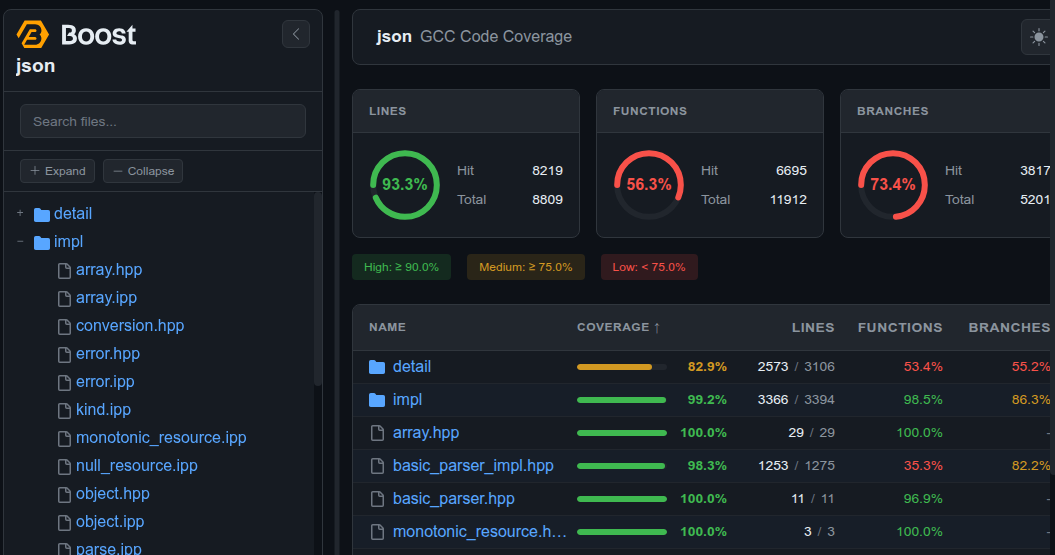
Copy the file .github/workflows/code-coverage.yml from boost-ci into your Boost library repository.
Run the workflow at least once, which can be done manually. This will create a branch called "code-coverage" to store reports. On this branch a single commit will be created and updated (amended) with every run of the workflow to reduce the size of the repository. Hence it is not intended for other commits as the last one will always be changed.
Next, enable GitHub Pages. Go to https://github.com/ORGANIZATION/REPO/settings/pages and enable the new branch.
The coverage will be hosted at https://ORGANIZATION.github.io/REPO
To display coverage badges in your repository's README, use the following Markdown snippets. Replace {organization} with the github organization, {branch} with the branch name (e.g. develop, master) and {repo} with your repository name (e.g. json, capy).
Available badges:
| Badge | URL | Preview |
|---|---|---|
| Lines | https://{organization}.github.io/{repo}/{branch}/gcovr/badges/coverage-lines.svg |
 |
| Functions | https://{organization}.github.io/{repo}/{branch}/gcovr/badges/coverage-functions.svg |
 |
| Branches | https://{organization}.github.io/{repo}/{branch}/gcovr/badges/coverage-branches.svg |
 |
Markdown to copy into your README:
[](https://{organization}.github.io/{repo}/{branch}/gcovr/index.html)
[](https://{organization}.github.io/{repo}/{branch}/gcovr/index.html)
[](https://{organization}.github.io/{repo}/{branch}/gcovr/index.html)For example, boostorg/json on the develop branch:
[](https://boostorg.github.io/json/develop/gcovr/index.html)
[](https://boostorg.github.io/json/develop/gcovr/index.html)
[](https://boostorg.github.io/json/develop/gcovr/index.html)