- String read:
fn main() {
    // collect the characters as a vector of char
    let chars = "hi 🦀".bytes().collect::<Vec<u8>>(); // convert to ASCII
    for char in chars {
        print!("{} ", char); // 1 bytes => 8 bits
    }
    println!("");
    let tokens: Vec<char> = "hi 🦀".chars().collect(); // char is utf-8 by default
    for token in tokens {
        print!("{} ", token as u32); // 4 bytes => 32 bits
    }
}
Output:
104 105 32 240 159 166 128
104 105 32 129408 # the first three elements is the same- String as parameter
Stringand&strand&'static strare all utf-8 by efault, and can be passed to function through slice.
fn say_it_loud(msg:&str){
    println!("{:?}!!!",msg.to_string().to_uppercase().chars());
}

fn main() {
    // say_it_loud can borrow &'static str as a &str
    say_it_loud("hello");
    // say_it_loud can also borrow String as a &str
    say_it_loud(&String::from("ヽ(* ゚ д ゚)ノ"));
}- String builtin functions
concat(): concat an array to a &str, eg.helloworld = ["hello", " ", "world", "!"].concat();join(): you can add something in()as an argument, eg.abc = ["a", "b", "c"].join(",");
- Rust supports polymorphism with
traits.
// Define a trait
trait Printable {
    fn print_info(&self);
}

// Define a function shows polymorphism
fn display_info<T: Printable>(item: T) {
    item.print_info();
}

// It doesn't care about the data type
display_info(person); // 输出: Person: Name - Alice, Age - 30
display_info(book); // 输出: Book: Title - The Great Gatsby, Author - F. Scott Fitzgerald- Box: is a struct with a known size (because it just holds a pointer)
struct Ocean {
    animals: Vec<Box<dyn NoiseMaker>>,  // you only have access to the trait of the struct
}
struct Ocean {
animals: Vec<Box<SeaCreature>>, // you can access everything in the struct
}- One can use
implto imply a method, and you also need a&self, which refer to the struct which you imply the trait for.
trait NoiseMaker {
    fn make_noise(&self);

    fn make_alot_of_noise(&self){
        self.make_noise();
        self.make_noise();
        self.make_noise();
    }
}

impl NoiseMaker for SeaCreature {
    fn make_noise(&self) {
        println!("{}", &self.get_noise());
    }
}- Raw pointer
- *const T: A raw pointer to data of type T that should never change.
- *mut T: A raw pointer to data of type T that can change.
Like in C++, int* x means that dereference to an address(i.e. x) get an int, we look forward in Rust
fn main() {
    let a = 42;
    let memory_location =  &a as *const i32;
    println!("Data is here {:?}", memory_location); // Data is here 0x7fff4a0c0ebc
}
&a get the address, after dereference to it *const, we get an i32
And we can also
println!("Data is here {:?}", unsafe{*memory_location});
* Operator
- You can cast &i32 to *const i32, but it is not by default,
- &i32 get the value, and * is for dereference.
let b: i32 = *ref_a; //copy, because i32 is primitive with implement of Copy traitA type that gives us access to another type.
- Typically smart pointers implement
Deref,DerefMut, andDroptraits to specify the logic of what should happen when the structure is dereferenced with * and . operators.In another word, if a struct implement these trait, it becomes a smart pointer. Just like
{:?}calls for the traitDebug
use std::ops::Deref;
struct TattleTell<T> {
    value: T,
    other: T,
}
impl<T> Deref for TattleTell<T> {
    type Target = T;
    fn deref(&self) -> &T {
        println!("{} was used!", std::any::type_name::<T>());
        &self.other // &self.value
    }
}
fn main() {
    let foo = TattleTell {
        value: "secret message",
        other: "Test",
    };
    // dereference occurs here immediately
    // after foo is auto-referenced for the
    // function `len`
    println!("{}", foo.len());
    // 4, derefer to foo.other
    // 14, derefer to foo.value
}- When you have no access to the inner data of a smart pointer, you can implicitly use derefernece function to help you get to know the value, as is shown in
Deref
use std::alloc::{alloc, Layout};
use std::ops::Deref;

struct Pie {
    secret_recipe: usize,
}

impl Pie {
    fn new() -> Self {
        // let's ask for 4 bytes
        let layout = Layout::from_size_align(4, 1).unwrap();

        unsafe {
            // allocate and save the memory location as a number
            let ptr = alloc(layout) as *mut u8;
            // use pointer math and write a few
            // u8 values to memory
            ptr.write(86);
            ptr.add(1).write(14);
            ptr.add(2).write(73);
            ptr.add(3).write(64);

            Pie { secret_recipe: ptr as usize }
        }
    }
}
impl Deref for Pie {
    type Target = f32;
    fn deref(&self) -> &f32 {
        println!("we derefer!");
        // interpret secret_recipe pointer as a f32 raw pointer
        let pointer = self.secret_recipe as *const f32;
        // dereference it into a return value &f32
        unsafe { &*pointer }
    }
}
fn main() {
    let p = Pie::new();
    // "make a pie" by dereferencing our
    // Pie struct smart pointer
    println!("{:?}", *p);
}
In this code, Drop is just recommended
impl Drop for Pie {
    fn drop(&mut self) {
        println!("we drop!");
        let layout = Layout::from_size_align(4, 1).unwrap();
        unsafe {
            dealloc(self.secret_recipe as *mut u8, layout);
        }
    }
}
The output is:
we derefer!
3.1415
we drop!
- Error trait and the Display of it
You cannot directly call Display trait methods on a value. Instead, you should use
format!orprintln!macros which internally call the Display trait methods.
use std::fmt::Display;
use std::error::Error;

struct Pie;

#[derive(Debug)]
struct NotFreshError;

impl Display for NotFreshError {
    fn fmt(&self, f: &mut std::fmt::Formatter<'_>) -> std::fmt::Result {
        write!(f, "This pie is not fresh!")
    }
}

impl Error for NotFreshError {}

impl Pie {
    fn eat(&self) -> Result<(), Box<dyn Error>> {
        Err(Box::new(NotFreshError))
    }
}

fn main() -> Result<(), Box<dyn Error>> {
    let heap_pie = Box::new(Pie);
    match heap_pie.eat() {
        Ok(_) => println!("Pie was eaten successfully."),
        Err(e) => println!("{}", e), // you get "This pie is not fresh!"
    }
    Ok(())
}-
Combing smart pointers
- Rc <-> Arc: single thread <-> multithread
- moves data from the stack onto the heap, and allow others to clone it
- RefCell <-> Mutex: single thread <-> multithread
- About mutable and immutable Reference(i.e. borrow)
- Rc <-> Arc: single thread <-> multithread
-
Common examples :
Rc<Vec<Foo>>: allow clone many pointers that can borrow the same vector of immutable data structures on the heap.Rc<RefCell<Foo>>: Allow multiple smart pointers the ability to borrow mutably/immutably the same structArc<Mutex<Foo>>: Allow multiple smart pointers the ability to lock temporary mutable/immutable borrows in a CPU thread exclusive manner.
-
Example:
use std::sync::{Arc, Mutex};
use std::thread;

fn main() {
    let shared_data = Arc::new(Mutex::new(vec![1, 2, 3]));

    let cloned_data = Arc::clone(&shared_data);

    thread::spawn(move || { // move, so you cannot access the data in cloned_data after this function
        let mut data = cloned_data.lock().unwrap();
        data.push(4);
    }).join().unwrap();

    println!("Final data: {:?}", shared_data.lock().unwrap()); // [1, 2, 3, 4]
}
cloned datarefers to the address in the heap which is stored as Mutex, use it just as aMutexlock()会阻塞直到它获得锁,如果锁已经被其他线程持有,那么调用线程就会等待unwrap()用来处理可能的错误spawn()pass a closure as an argument, Rust will execute it in a new thread as child thread
Note that thread::spawn() returns immediately with a JoinHandle type without waiting for the child thread to finish its task. This means the main thread continues to run while the child thread executes asynchronously. But, CAN IT JUST OMIT THE CHILD THREAD?
join()==JoinHandle::join()called explicitly to wait for the child thread to complete. The main thread therefore get blocked until the child thread finish
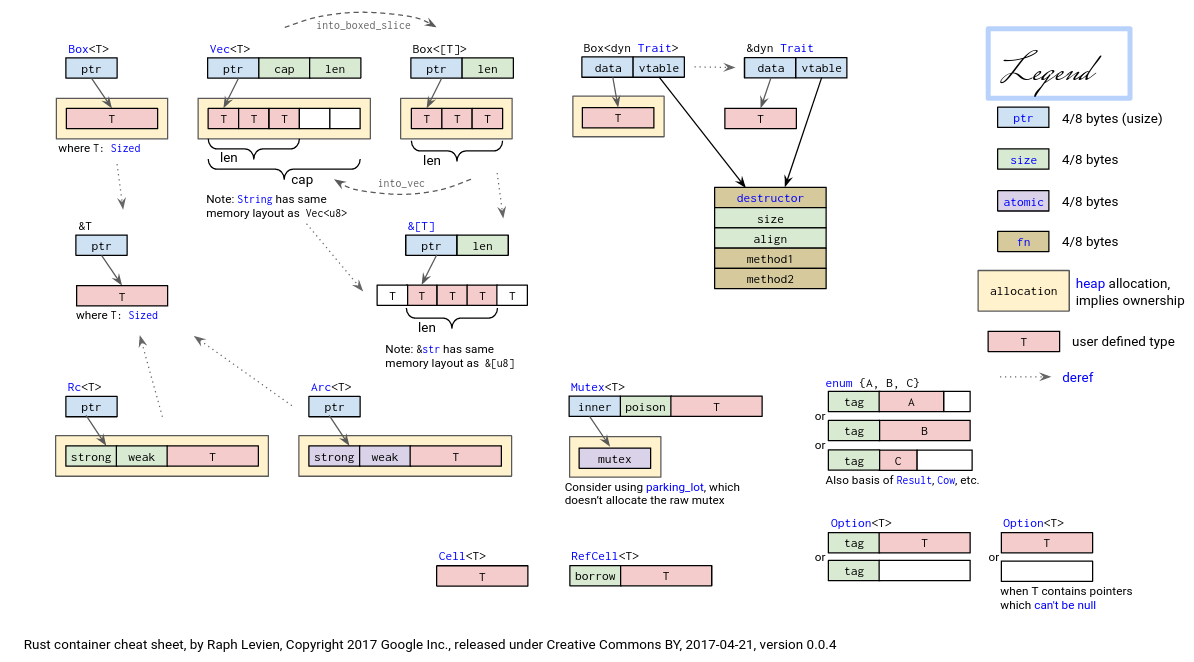
-
stdis the crate of the standard library of Rust which is full of useful data structures and functions for interacting with your operating system. -
a module
foocan be represented as:- a file named
foo.rs - a directory named foo with a file
mod.rs(module) inside
- a file named
-
Hierarchy:
mod foowill look forfoo.rsorfoo/mod.rs- Inside
mod.rsyou can also usemod foo_son - Then you can
use foo_son::{...}, to import your functions - keyword
use:- crate - the root module of your crate (e.g.
use crate::sbi::shutdown, stand for something written orpub useby themain.rsorlib.rs, i.e. the root module) - super - the parent module of your current module
- self - the current module
- crate - the root module of your crate (e.g.
-
unit test:
#[cfg(test)]
mod tests {
    // Notice that we don't immediately get access to the
    // parent module. We must be explicit.
    use super::*;

    ... tests go here ...
}Anology to cpp
void add(int a, int b, int w) {
    e[cur] = b, ne[cur] = h[a], h[a] = cur++;
}
A BFS example is here
More can be referred here
- Type-name of a variable
use std::any::type_name;

// A function that prints the type name of its generic parameter
fn print_type_of<T>(_: T) {
    println!("The type is: {}", type_name::<T>());
}

fn main() {
    let my_string = String::from("  Hello, World!  ");

    // Using trim() and converting back to String
    let trimmed = my_string.trim();
    print_type_of(trimmed);
    print_type_of(my_string);

}- Template in ICPC
// Author: ヽ(* ゚ д ゚)ノ
#![allow(unused_imports)]
use std::cmp::{min,max};
use std::io::{self, Write};
use std::str;
use std::collections::HashSet;
use io::BufRead;

fn solve<R: BufRead, W: Write>(scan: &mut Scanner<R>, out: &mut W) {
    // code here
}

fn main() {
    let (stdin, stdout) = (io::stdin(), io::stdout());
    let mut scan = Scanner::new(stdin.lock());
    let mut out = io::BufWriter::new(stdout.lock());
    let T: usize = 1;
    // let T = scan.token::<usize>();
    for _ in 0..T{
        solve(&mut scan, &mut out);
    }
}

struct Scanner<R> {
    reader: R,
    buf_str: Vec<u8>,
    buf_iter: str::SplitAsciiWhitespace<'static>,
}
impl<R: io::BufRead> Scanner<R> {
    fn new(reader: R) -> Self {
        Self { reader, buf_str: Vec::new(), buf_iter: "".split_ascii_whitespace() }
    }
    fn token<T: str::FromStr>(&mut self) -> T {
        loop {
            if let Some(token) = self.buf_iter.next() {
                return token.parse().ok().expect("Failed parse");
            }
            self.buf_str.clear();
            self.reader.read_until(b'\n', &mut self.buf_str).expect("Failed read");
            self.buf_iter = unsafe {
                let slice = str::from_utf8_unchecked(&self.buf_str);
                std::mem::transmute(slice.split_ascii_whitespace())
            }
        }
    }
}vector:
let pile: Vec<_> = (0..n).map(|_| scan.token::<usize>()).collect();
let mut t: Vec<i32> = vec![];Stringas ASCII and other tricks
let p: Vec<u8> = scan.token::<String>().bytes().collect();filter()use to judge if the element is true or not- e.g.
numbers.iter().filter(|&x| x % 2 == 0)orfor special in (0..=m_cows).filter(|&i| r[i] > 0) {...} - You need
&to get a refer of the value, ensuring no modification of value
- e.g.
map()map an element to another element- e.g.
numbers.iter().map(|x| x * 2).collect::<Vec<_>>();
- e.g.
drain()find()