Date: 15th November 2024
Status: Review
Authors:
- Kim T, StudioRack
- Arthur P, OwlPlug
This document is licensed under a Creative Commons 4.0 license.
This document describes an open specification for audio package managers. The goal is to enable interoperability between multiple audio platforms and the software installed locally on users computers.
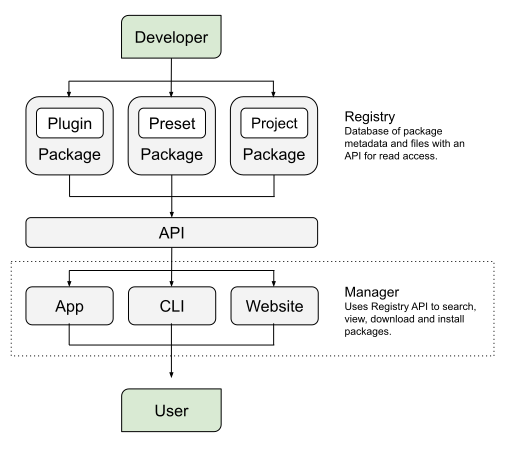
This dotted line in the diagram indicates the scope of this specification. A separate specification focuses on the upper area of the diagram: audio package metadata stored in a registry: Open Audio Stack - Registry - Specification 1.0.0
- Developer - Audio plugin developer who releases audio plugins.
- Package - Collection of files to be distributed along with metadata about those files:
- Plugin - File which adds digital signal processing or sound synthesis to audio software.
- Preset - File containing predefined settings for an audio plugin.
- Project - File which contains song data, in a format only for a specific DAW(s).
- Registry - Database containing audio package metadata with an API for read access.
- Audio plugin manager - Search, view, download and install audio plugins, using one of:
- App - Via a native application.
- Cli - Via a command-line tool.
- Website - Via a web page within a web browser.
- Plugin - Via an existing audio plugin, install additional features/presets.
- User - Musician using a computer to run audio software.
- Digital Audio Workstation (DAW) - software that allows users to record, edit, and produce audio.
Musicians install Digital Audio Workstation (DAW) software on computers to record and arrange music. They add audio plugins such as instruments and effects to extend their DAW functionality. The method of downloading and installing audio plugins differs depending on the company or individual distributing the software. The result is:
- Manual installation of audio plugins.
- Broken links.
- Unsupported systems/versions.
- Different audio plugin formats.
- Insecure binaries.
- Multiple audio plugin manager accounts.
- Multiple audio plugin managers with different interfaces and settings.
- No version control.
- No portability to other systems or collaborators.
- Difficulty expanding plugins with new presets.
This specification aims to solve these issues by applying established conventions and best practices from other well-known software package managers such as npm, pip, maven, gems and composer. Audio plugin managers adopting this specification will be compatible and interoperable with each other. Musicians using compatible audio plugin managers will benefit from well-established package management features.
- Search for audio plugins and filter by metadata attributes such as platform or license.
- View audio plugin details such as description and size and preview image and audio.
- Download and install audio plugins, including specific versions.
- Install plugin versions automatically choosing the best version of each for your system.
- Download and extract files into configured directories.
- Extend existing plugin functionality by installing additional presets.
Package managers are usually applications or command-line tools, which connect to a Registry API to search/download and install packages. Package managers can be built in any technology or language, but they must be able to run on a Users machine (Linux, Mac, Win) and call the Registry API (as defined inOpen Audio Stack - Registry - Specification 1.0.0).
Package managers can be implemented as full applications with user interfaces, command-line tools or scripts. Websites can choose to implement part of this specification to make packages discoverable and easy-to-download. This specification includes examples demonstrating how it could be implemented as a command-line tool..
| Field | Type | Description | Example |
|---|---|---|---|
| name | string | Manager name brand-specific | "Open Audio Stack Manager" |
| version | string | Semantic Version which is different from the Registry specification version. | "1.0.0" |
$ manager --help
Usage: manager [options] [command]
Options:
  -V, --version              output the version number
  -h, --help                 display help for command
$ manager --version
1.0.0
$ manager <command> --log
$ manager <command> --json
A configuration should be populated by default when the manager first runs, but the user can override the config when needed. Config is stored in memory, ConfigLocal can be used to persist config as a file. Access to config is important for debugging issues with the manager. Configuration could be stored in any format, JSON format is preferred for simple read/write operations with structured data.
Config should be versioned separately from the manager program, so the manager can check if an old version exists and upgrade it to match a new configuration format.
$ manager config get version
1.0.0
All config values can be set/get by the manager interface. For example:
$ manager config set <key> <value>
$ manager config get <key>
List of registries which will be searched for packages. This allows brands/companies to each own a package list, but registries are combined for the user consuming the list.
| Field | Type | Description | Example |
|---|---|---|---|
| name | string | Registry name | "Open Audio Registry" |
| url | string | Registry url | "https://open-audio-stack.github.io/open-audio-stack-registry" |
$ manager config get registries
[
  { "name": "Open Audio Registry", "url": "https://open-audio-stack.github.io/open-audio-stack-registry"}
]
Registries can expose versioned endpoints to avoid breaking changes when introducing new features. When a registry is versioned, managers should append the version segment to the registry root when requesting resources.
Example: Registry root https://example.com/registry with version v1 → fetch plugin list at https://example.com/registry/v1/plugins.
Versioning is optional — if Managers call the root url, they will get the latest version by default.
Defaults to manager installation directory.
| Platform | Path |
|---|---|
| Linux platform | $HOME/.local/share/$manager |
| Mac platform | $HOME/Library/Preferences/$manager |
| Windows platform | $HOME\$manager |
Defaults to manager installation directory.
| Platform | Path |
|---|---|
| Linux platform | /usr/local/bin |
| Mac platform | /Applications |
| Windows platform | $HOME\AppData\Local\Programs |
Default plugin installation path per platform. Users are able to change the path via settings.
| Platform | Path |
|---|---|
| Linux platform | $HOME/usr/local/lib/$format |
| Mac platform | $HOME/Library/Audio/Plug-ins/$format |
| Windows platform | C:\Program Files (x86)\Common Files\$format |
Recommended sub-directory hierarchy to keep installed plugins separate and easier to manage:
$plugin_dir/$plugin_slug/$plugin_version/
For example:
$plugin_dir/surge-synthesizer/surge/1.3.1/surge.vst3
$ manager config get pluginsDir
/Users/username/Library/Audio/Plug-ins
Default preset installation path per platform. Users are able to change the path via settings.
| Platform | Path |
|---|---|
| Linux platform | $HOME/.vst3/presets |
| Mac platform | $HOME/Library/Audio/Presets |
| Windows platform | $HOME/Documents/VST3 Presets |
Recommended sub-directory hierarchy to keep installed plugins separate and easier to manage:
$preset_dir/$preset_slug/$preset_version/
For example:
$preset_dir/jh/floating-rhodes/1.0.0/
$ manager config get presetsDir
/Users/username/Library/Audio/Presets
Default project installation path per platform. Users are able to change the path via settings.
| Platform | Path |
|---|---|
| Mac platform | $HOME/Documents/Audio |
| Linux platform | $HOME/Documents/Audio |
| Windows platform | $HOME\Documents\Audio |
Recommended sub-directory hierarchy to keep installed plugins separate and easier to manage:
$project_dir/$project_slug/$project_version/
For example:
$project_dir/kmt/banwer/1.0.1/Banwer.als
$ manager config get projectsDir
/Users/username/Documents/Audio
These functions can be run in a browser as part of a website or app. They do not rely on access to the local machine. ManagerLocal extends this with methods to install and manage plugins locally.
Registries can contain different types of packages, more could be added in the future. We recommend limiting user-facing features to a single registry type for each operation. This ensures the operation is performed quickly as the registry scales.
| Name | Value |
|---|---|
| Apps | apps |
| Plugins | plugins |
| Presets | presets |
| Projects | projects |
Managers should detect the current architecture as the default platform for installing plugins. However, users should be allowed to override this to install plugins from another architecture when necessary.
The compatibility rules for plugin architectures depend entirely on the Host (DAW). Plugin Managers cannot always rely on the system's "Runtime Platform" (which would be ARM64 for a native app) because the user's DAW might be running in a different mode.
For example, on Windows 11 on Arm devices supporting ARM64EC (Emulation Compatible), if the Plugin Manager is running natively as ARM64, but the DAW is running in emulated x64 mode, installing a native ARM64 plugin will result in the DAW failing to see or load the plugin. In this case, the user should set the Desired Platform to x64 to install x64-compatible plugins.
The best practice is to allow users to manually set a Desired Platform in the manager's configuration, overriding the auto-detected architecture.
The purpose of remote syncing is to call multiple registries and aggregate remote packages into a precalculated index/cache, which speeds up any subsequent operations performed by the app. In most cases the manager will use this feature internally and the user will not need to use it directly.
- For each Registry in the configuration
- Call the API to load the list of package metadata
- Combine packages from multiple registries into a single index
- Store package metadata in-memory as a read-only cache to speed up the app instead of making API requests constantly. Manager Local can store the aggregated registry on disk.
$ manager <registryType> sync
Filter the registry package index by field and matching value. Returns an array of matching packages.
$ manager <registryType> filter <field> <value>
Search the registry package index for lazy matching query. Returns an array of matching packages. Default query searches slug, name, description and tags fields.
$ manager <registryType> search <query>
Returns all the packages cached in the registry.
$ manager <registryType> list
$ manager <registryType> list --installed
Get a package metadata and list of versions.
$ manager <registryType> get <slug>
Get a specific package version metadata.
$ manager <registryType> get <slug>@<version>
Resets/clears the synced package list.
$ manager <registryType> reset
These functions have to have access to the local machine. They cannot be run inside a browser.
The purpose of directory scanning is to aggregate all locally installed packages into a precalculated index/cache, which speeds up any subsequent operations performed by the app. In most cases the manager will use this feature internally and the user will not need to use it directly.
- Load package directories which match the following patterns:
$plugin_dir/VST/surge-synthesizer/surge/1.3.1$plugin_dir/VST3/surge-synthesizer/surge/1.3.1
- For each directory check to see if an
index.jsonmetadata file exists.- If
index.jsondoes not exist, search for package in Registry API- If package not found in Registry, add to list of unsupported packages
- If package found in Registry, download metadata.json as
index.jsonfile and add to list of supported packages
- If
index.jsondoes exist, run Package Validation to ensure it is a valid package file. This checks the json is in the correct structure, with the required attributes and valid values.- If not valid, add to list of unsupported packages
- If valid, add to list of supported packages
- If
- Store package metadata either in-memory or on disk. For example a file can serve as a read-only cache to speed up the app, instead of syncing the files/folders constantly.
$ manager <registryType> scan
Install a package by slug. Optionally including a version.
- Get package version metadata from package index/cache:
- If package not found, return error
- If package version not found return error
- Check to see if package is already installed:
- If installed, return package information
- Check to see program has Admin privileges:
- If not ask for elevated privileges to filesystem
- Filter package files that match the current architecture and system:
- If Linux, check whether
dpkgorrpmcommand is supported - If the system does not support the command, filter out those file formats
- If no files match, return error
- If Linux, check whether
- Download each matching file to a temporary directory.
- Check the hash against the metadata sha256.
- If hash and sha256 do not match, return error
- Check if the file type is installer
- Run the process in a separate thread
- When the process ends, run a local package scan to see if the installation finished correctly.
- Check if the file type is archive:
- Extract the archive to a temporary directory
- Move files into the final directory e.g.
$plugin_dir/VST/surge-synthesizer/surge/1.3.1$plugin_dir/VST3/surge-synthesizer/surge/1.3.1
- For each moved file, save the package metadata into the same directory as
index.json, which speeds up local scanning. - Return package information with
installed = true - Optionally re-run the scan feature to update the package index/cache.
$ manager <registryType> install <slug>@<version>
Uninstall a package by slug. Optionally including a version.
- Get package version metadata from package index/cache:
- If package not found, return error
- If package version not found return error
- Check to see if package is installed:
- If not installed, return error
- Check to see program has Admin privileges:
- If not ask for elevated privileges to filesystem
- Remove the specific package version directory and files
$plugin_dir/VST/surge-synthesizer/surge/1.3.1$plugin_dir/VST3/surge-synthesizer/surge/1.3.1
- If the package directory does not contain other versions then remove it
$plugin_dir/VST/surge-synthesizer/surge$plugin_dir/VST3/surge-synthesizer/surge
- If the org directory does not contain other packages then remove it
$plugin_dir/VST/surge-synthesizer$plugin_dir/VST3/surge-synthesizer
- Return package information with
installed = falseor the attribute removed. - Optionally re-run the scan feature to update the package index/cache.
$ manager <registryType> uninstall <slug>@<version>
Clone a new package from a template.
- Check to see if package is already installed
- If installed, return package already installed message
- If not installed, proceed to next step
- Download package template to temporary directory and extract contents
- Clone package target directory, move template contents into package directory.
$ manager <registryType> clone <slug> <template>
audioauthorchangesdatedescriptiondonateimagefileslicensenametagstypeurl
Create new package metadata:
$ manager <registryType> create <path>
audioauthorchangesdatedescriptiondonateimagefileslicensepluginsnametagstypeurl
- Get package version metadata from package index/cache:
- If package not found, return error
- If package version not found return error
- Check to see if package is installed:
- If not installed, return error
- Filter package
filesentries that match the current architecture and system - Find a
filesentry that includes anopenfield and matches the system/architecture:- If no compatible
filesentry with anopenfield is found, return error
- If no compatible
- Execute the file/command specified in that
filesentry'sopenfield.
Note: The manager will use the open field defined in the package metadata (per-file) to determine the correct entry point for the target system.
Open any package by slug and version:
$ manager <registryType> open <slug>@<version>
For all project commands the <path> option is optional:
- <
path> - Will use this project file - None - Will use the current directory and filename
index.json
- Get dependency package version metadata from package index/cache:
- If package not found, return error
- If package version not found return error
- If the local project path is not supplied use the current directory, then load and parse as json.
- If not valid json, return error.
- Validate local package json file structure, fields and values.
- If not validate structure, fields or values, return error.
- Check whether the dependency has already been added.
- If already added, then return error.
- Install dependency using same logic as package install
- Add dependency to the local package file and save.
$ manager project install <plugin-slug>@<plugin-version> <path>
Install existing dependencies listed inside a package json file.
- If path is not supplied use the current directory, then load and parse as json.
- If not valid json, return error.
- Validate package json file structure, fields and values.
- If not validate structure, fields or values, return error.
- Loop through dependency packages and install each one.
- Return any errors following package installation logic.
- If all dependencies are installed successfully, return parsed json data.
$ manager project install <registryType> <path>
$ manager project install plugins
- If the local project path is not supplied use the current directory, then load and parse as json.
- If not valid json, return error.
- Validate local package json file structure, fields and values.
- If not validate structure, fields or values, return error.
- Check whether the dependency exists in the local package json file.
- If not a dependency, then return error.
- Uninstall dependency using same logic as package uninstall
- Remove dependency from the local package file and save.
$ manager project uninstall <plugin-slug>@<plugin-version> <path>
Uninstall dependencies listed inside a package json file.
- If path is not supplied use the current directory, then load and parse as json.
- If not valid json, return error.
- Validate package json file structure, fields and values.
- If not validate structure, fields or values, return error.
- Loop through dependency packages and uninstall each one.
- Return any errors following package uninstall logic.
- If all dependencies are uninstalled successfully, return parsed json data.
$ manager project uninstall <registryType> <path>
$ manager project uninstall plugins