


This repository is a template project for implementing the Orchestrator-Workers pattern introduced in Anthropic's blog "Building effective agents" using Azure Durable Functions.
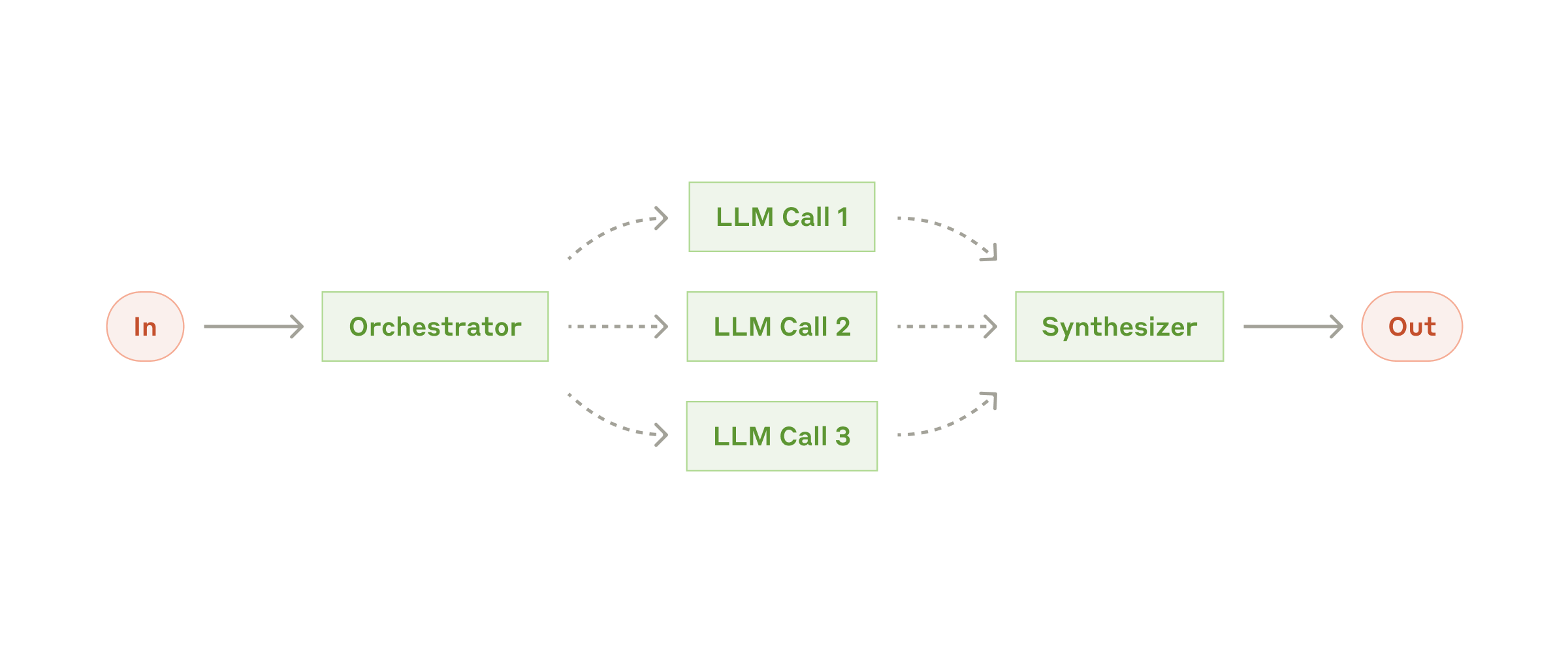
For more insights on building serverless AI agents using Durable Functions, check out Chris Gillum's blog post: Building Serverless AI Agents using Durable Functions on Azure
Case of synchronous endpoint:
sequenceDiagram
    participant Client
    participant Sarter
    participant DurableOrchestrator
    participant AgentDeciderActivity
    participant WorkerAgentActivity
    participant SynthesizerActivity

    Client->>Sarter: Web API request
    Sarter->>DurableOrchestrator: Start
    DurableOrchestrator ->> AgentDeciderActivity: Decide agent to call
    AgentDeciderActivity ->> DurableOrchestrator: Agent that should call
    DurableOrchestrator -->> Sarter: If no agent to call, return plain text
    DurableOrchestrator ->> WorkerAgentActivity: Invoke(Multiple & Parallel)
    WorkerAgentActivity ->> DurableOrchestrator: Result
    DurableOrchestrator ->> SynthesizerActivity: Synthesize result & generate answer
    SynthesizerActivity ->> DurableOrchestrator: Synthesized answer
    DurableOrchestrator ->> Sarter: Answer
    Sarter ->> Client: Web API respons
This Multi-Agent system is based on a travel concierge scenario. Each Agent is set to return fixed values as responses for sample purposes. The sample Agents defined in the template are as follows:
- GetDestinationSuggestAgent:Get the destination suggestion
- GetClimateAgent:Get the climate of the destination
- GetSightseeingSpotAgent:Get the sightseeing spot of the destination
- GetHotelAgent:Get the hotel information of the destination
- SubmitReservationAgent:Submit the reservation of the hotel
Please modify the implementation of each agent, which currently uses fixed values, to include RAG, actions, and other processes, thereby creating agents that meet the requirements. Each agent can utilize OpenAI Client, Cosmos DB Client and application configuration values provided by the DI container.
Each agent's Activity method implements wait time as follows to emulate the LLM's completion time. When implementing an actual Agent based on the sample Agent, please remove the following parts from the code.
await Task.Delay(3000);To demonstrate the retry functionality of Durable Functions, each Agent includes code that emulates failures in external service calls, such as those to an LLM. Agent Activities fail randomly with a 30% probability during execution. When implementing an actual Agent based on the sample Agent, please remove the following parts from the code.
if(Random.Shared.Next(0, 10) < 3)
{
    logger.LogInformation("Failed to get climate information");
    throw new InvalidOperationException("Failed to get climate information");
}-
Before running, create the following resources:
- Azure OpenAI Service with a deployed chat completions model (embedding model deployment is optional)
- Azure Cosmos DB (optional, if used)
- Instead of Azure Cosmos DB, you can also use the Azure Cosmos DB Emulator. For more details, please refer to the documentation below.
Develop locally using the Azure Cosmos DB emulator
- Instead of Azure Cosmos DB, you can also use the Azure Cosmos DB Emulator. For more details, please refer to the documentation below.
-
Update the
local.settings.jsonof theDurableMultiAgentTemplateproject with your resource information below:- Azure OpenAI endpoint and deployment name
- Azure Cosmos DB endpoint (optional if not used)
You can choose between API key or Entra ID authentication for each service:
- If using an API key: Include the API key in the
local.settings.jsonfile. - If using Entra ID authentication: Authenticate using the
az logincommand with Azure CLI. Leave the API key blank in thelocal.settings.jsonfile. Note that the authenticated user must have RBAC permissions for each service.
-
Install and launch a local storage account using azurite.
Azurite is Microsoft’s open-source Azure Storage emulator, which starts the Blob and Queue storage required for Functions on your local machine.
Install azurite:
npm install -g azuriteFor more details, see: https://learn.microsoft.com/ja-jp/azure/storage/common/storage-use-azurite?tabs=visual-studio%2Cblob-storage
Start azurite with one of following commands.
azuritenohup azurite > azurite.log 2>&1 &- Run the project.
You can use either the .NET Blazor client or the Python Streamlit client for testing the project.
You can test the operation using a simple chat app in .NET as follows:
simpleagentchat.mp4
- Open the solution file
DurableMultiAgentTemplate.slnin Visual Studio 2022. - Select
Multi agent testas the startup project.- This will run both the Durable Functions and .NET client projects simultaneously.
- Press
F5to run the projects.- If you encounter an error, please check the
local.settings.jsonfile in theDurableMultiAgentTemplateproject.
- If you encounter an error, please check the
- From the activity bar in Visual Studio Code, select Run > Start Debugging.
- From the dropdown list, select
C#: Attach to DurableMultiAgentTemplate worker processand press the run button to the left of the dropdown list.- This will start the Functions host with the task
host start (functions). - In the Functions host terminal, a log like
"{ "name":"dotnet-worker-startup", "workerProcessId" : 12345 }"will be output. The workerProcessId is the ID of the process to which the debugger will attach. - When the
prelaunchTaskdialog appears, selectDebug Anyway. - A list of processes to attach the debugger will be displayed. Select the process that was output in the Functions host log earlier.
- The debugger will attach and debugging will start.
- This will start the Functions host with the task
- From the dropdown list, select
C#: Debug DurableMultiAgentTemplate.Clientand press the run button to the left of the dropdown list.
After running the project, you can access the client at http://localhost:{your port number}.
You can test the Orchestrator-Workers pattern using [Client/client.py]. It can be executed with the following command:
dotnet run --project .\DurableMultiAgentTemplate\DurableMultiAgentTemplate.csproj The client is created with Streamlit, so it can be run using the following command:
streamlit run client.py  The full-resolution video is here.
There are two types of endpoints: synchronous and asynchronous. If the agent's processing takes a long time, it is recommended to use the asynchronous endpoint. For more information about the asynchronous pattern in Durable Functions, see here.
- synchronous
http://{your base url}/api/invoke/sync - asynchronous
http://{your base url}/api/invoke/async
The request body will be below:
{
	"messages": [
		{
			"role": "user",
			"content": "I'm finding a travel destination."
		},
		{
			"role": "assistant",
			"content": "Please tell me your desired conditions for the travel destination. For example, a place with a beach, a place with many historical tourist spots, a place with abundant nature, etc. I will suggest a travel destination according to your preferences."
		},
		{
			"role": "user",
			"content": "I like a place with many historical tourist spots."
		}
	],
	"requireAdditionalInfo": true
}The response will be below:
{
	"additionalInfo": [
		{
			"$type": "mardown",
			"markdownText": "### Recommended Travel Destinations with Historical Landmarks\n#### Domestic\n1. **Okinawa Main Island**\n  - Rich in tourist attractions such as crystal-clear beaches, Shurijo Castle, and the Churaumi Aquarium. \n- Warm weather even in winter, offering a relaxed atmosphere.\n2. **Ishigaki Island and Miyako Island**\n - Expansive beautiful natural landscapes typical of the tropics, with popular activities like diving and snorkeling.\n- Enjoy unique local cuisine of the islands.\n3. **Kagoshima and Amami Oshima**\n - Experience Amami's black sugar shochu, island songs, and distinctive natural environments.\n- Enjoy the subtropical atmosphere."
		}
	],
	"content": "Here are some recommended travel destinations with many historical landmarks:\n1. **Okinawa Main Island** - Features spots that blend history and tourism, such as Shurijo Castle and the Churaumi Aquarium.\n2. **Kagoshima and Amami Oshima** - Enjoy island songs and the subtropical atmosphere.\n3. **Ishigaki Island and Miyako Island** - Known for unique local cuisine and natural landscapes.\nFor more details, please refer to the additional information.",
	"calledAgentNames": [
		"GetDestinationSuggestAgent"
	]
}
The full-resolution video is here.
In general, responses from agents, especially when they include retrieval-augmented generation (RAG), can become lengthy and negatively affect the chat experience. To improve this, separating static additional information from the flow of the chat can enhance the user experience.
In this template, you can request additional information by setting requireAdditionalInfo to true when making a request. The additional information will be returned separately from the chat response and stored in the additionalInfo field.
By toggling the REQUIRE_ADDITIONAL_INFO flag in the client code for testing, you can experience this functionality in action.

This feature also reduces the token count of the messages array in the chat history, making the LLM's performance lighter.
However, in some cases, the lack of context in the messages array might result in unnatural agent responses.
In such cases, you may consider merging the additional information back into the messages array and requesting the agent's response accordingly.