Releases: AtlasServer-Core/AtlasAI-CLI
v0.2.8 - AtlasAI-CLI

AtlasAI-CLI v0.2.8 - Release Notes
🚀 Enhanced File Operations & Advanced Agents
We're excited to announce AtlasAI-CLI v0.2.8, which introduces a powerful set of file manipulation tools and an improved agent architecture, transforming our command-line assistant into an even more comprehensive solution for application development and deployment.
✨ New Features
📝 File Manipulation Tools
The AI agent can now create, modify, and update files on your system:
- write_file: Create new files or overwrite existing ones
- append_file: Add content to the end of existing files
- edit_file: Search and replace text in existing files
These operations enable the agent to:
# The agent can now create configuration files
atlasai --query "Create a .env file for my Express project with MongoDB environment variables"

# Modify existing files
atlasai --query "Update my package.json to add authentication dependencies"

# Generate documentation
atlasai --query "Analyze my project and create a detailed README.md"
🧠 Improved Prompt System
We've implemented a centralized prompt architecture that includes:
- Base prompts: Fundamental instructions for each agent type
- Advanced prompts: Enhanced analysis and reasoning capabilities
- Combined prompts: Flexibility to select the agent's capability level
- Multilingual support: Maintaining technical terminology in English
🛠️ Improvements
- Modular architecture: Code reorganization for better maintainability and extensibility
- Robust validation: Enhanced verifications for each file operation
- Improved visual format: Specific visualization for each type of file operation
- Structured responses: Better formatting in project analysis and general responses
- Advanced error handling: Clearer and more descriptive error messages
🔧 Technical Details
- New structure for file manipulation in
atlasai/tools/tools.py - Centralized prompt system in
atlasai/ai/prompts.py prompt_levelparameter to control the agent's sophistication level- Comprehensive validation for file operations with specific error messages
- Compatibility with relative and absolute paths in all operations
- Continued support for local (Ollama) and cloud (OpenAI) models
🔮 What's Next
We continue working to make AtlasAI-CLI more powerful and user-friendly. Future updates will include:
- Template integration for different project types
- Code refactoring capabilities
- Detection and resolution of common errors
- Performance improvements for large-scale projects
💻 Installation & Update
# New installation
pip install atlasai-cli

# Update existing installation
pip install --upgrade atlasai-cli
For specific examples of the new file manipulation tools:
atlasai --query "What file operations can you perform?"v0.2.5 - AtlasAI-CLI
AtlasAI-CLI v0.2.5 - Release Notes
🚀 General Purpose AI Query Command
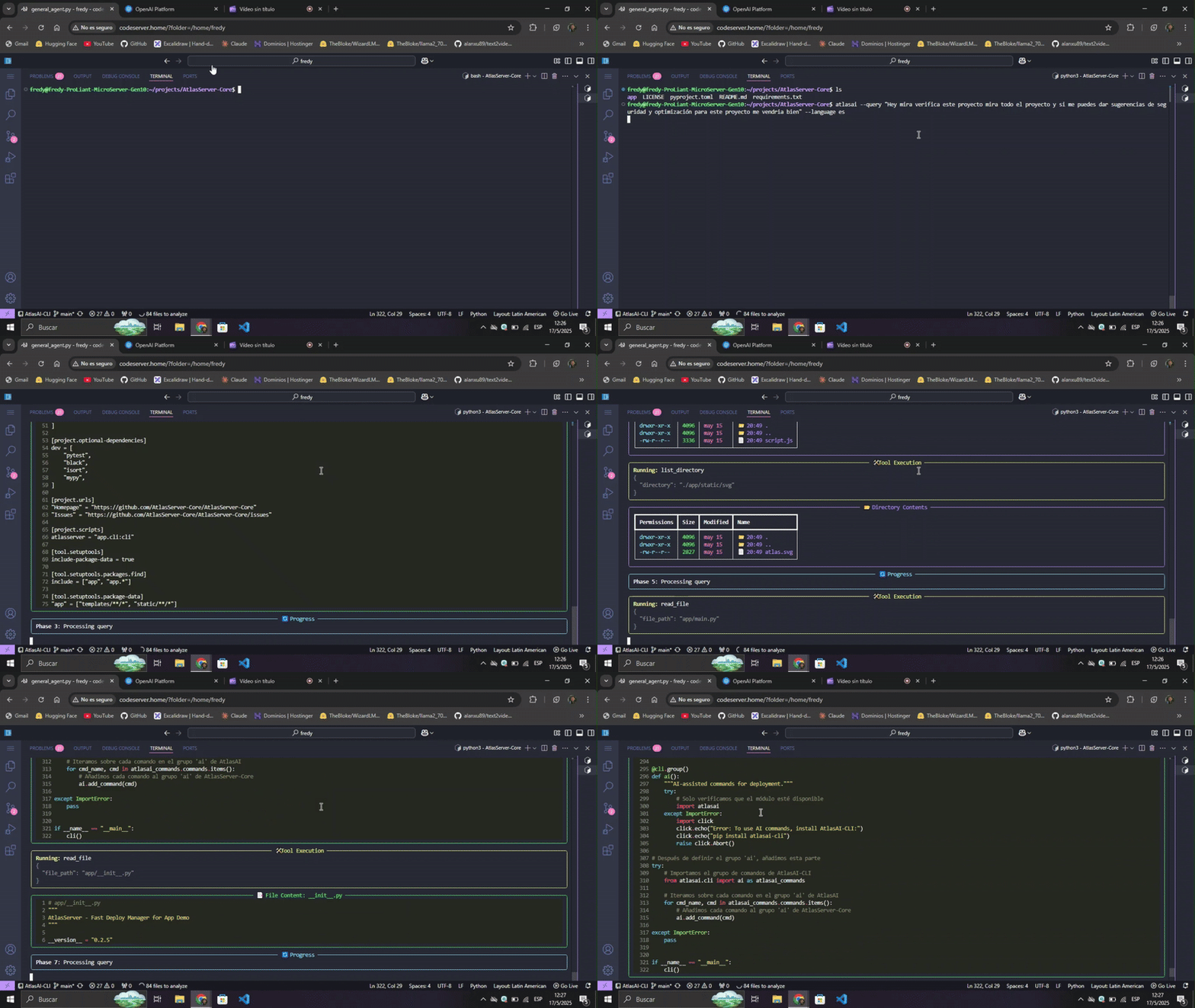
We're excited to announce AtlasAI-CLI v0.2.5, which introduces a powerful new feature that transforms your command line into an intelligent assistant capable of understanding and responding to general queries about your system and projects.
✨ New Features
--query Command
Now you can directly ask AtlasAI anything about your system, projects, or development needs:
# Basic usage
atlasai --query "What projects do I have in my directory and how can I deploy them?"

# Specify language
atlasai --query "Analiza los archivos de configuración de este proyecto" --language es

# With debug mode
atlasai --query "Compare the different package managers for JavaScript" --debug
The AI will intelligently:
- Decide which tools to use based on your query
- Explore your filesystem when relevant
- Search the web for information when needed
- Execute safe commands to gather system information
- Provide detailed, formatted responses with code examples
🛠️ Improvements
- Rich Visualizations: Results are displayed in beautiful Markdown format with proper code highlighting
- Tool Selection: AI automatically chooses the right tools for answering your questions
- Multilingual Support: Get responses in Spanish with the
--language esflag while maintaining technical terms in English - Interactive Execution: Watch the AI think through the process with real-time updates
- Format Consistency: Matched the visual style and format of other commands for a unified experience
🔧 Technical Details
- Enhanced the agent architecture to support dynamic tool selection
- Added comprehensive validation and error handling
- Improved the system prompt based on modern AI assistants
- Added support for relative and absolute paths in file operations
- Compatible with both Ollama (local) and OpenAI (cloud) providers
🔮 What's Next
We're continuously working to make AtlasAI-CLI more powerful and user-friendly. Future updates will include additional tools, improved project analysis, and deeper integration with development workflows.
💻 Installation & Update
# New installation
pip install atlasai-cli

# Update existing installation
pip install --upgrade atlasai-cli
📚 Documentation
For more details on using these new features, check out our documentation.