-
-
Notifications
You must be signed in to change notification settings - Fork 403
Update README.md #5
New issue
Have a question about this project? Sign up for a free GitHub account to open an issue and contact its maintainers and the community.
By clicking “Sign up for GitHub”, you agree to our terms of service and privacy statement. We’ll occasionally send you account related emails.
Already on GitHub? Sign in to your account
base: CreamApp
Are you sure you want to change the base?
Changes from all commits
File filter
Filter by extension
Conversations
Jump to
Diff view
Diff view
There are no files selected for viewing
| Original file line number | Diff line number | Diff line change | ||||
|---|---|---|---|---|---|---|
| @@ -1,10 +1,65 @@ | ||||||
| ### CreamInstaller: Automatic DLC Unlocker Installer & Configuration Generator | ||||||
|
|
||||||
| 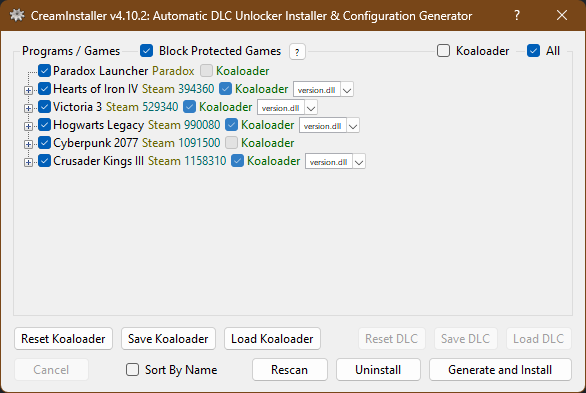 | ||||||
| # ⚠️ Disclaimer | ||||||
| ## (Read before installation and Follow Us on Github !) | ||||||
|
|
||||||
| ###### **NOTE:** This is simply a preview image; this is not a list of supported games nor configurations! | ||||||
| > **This software is an open-source project developed for the community and is not affiliated with any organization or institution.** | ||||||
| > It is shared purely for **educational purposes**, software development testing, and to contribute to the growth of the open-source community. | ||||||
|
|
||||||
| ##### The program utilizes the latest version of [CreamAPI](https://cs.rin.ru/forum/viewtopic.php?f=29&t=70576) by [deadmau5](https://cs.rin.ru/forum/viewtopic.php?f=29&t=70576). It also utilizes the latest versions of [Koaloader](https://github.com/acidicoala/Koaloader), ~~[SmokeAPI](https://github.com/acidicoala/SmokeAPI)~~, [ScreamAPI](https://github.com/acidicoala/ScreamAPI), [Uplay R1 Unlocker](https://github.com/acidicoala/UplayR1Unlocker) and [Uplay R2 Unlocker](https://github.com/acidicoala/UplayR2Unlocker), all by [acidicoala](https://github.com/acidicoala). All unlockers are downloaded and embedded into the program itself; no further downloads necessary on your part! | ||||||
| --- | ||||||
|
|
||||||
| ### 🛡️ Antivirus / False Positive Warning | ||||||
|
|
||||||
| > ⚠️ **As is widely known, all software that modifies or interacts with DLL files may be flagged as a virus by antivirus programs.** | ||||||
|
|
||||||
| VirusTotal scan results and antivirus software **may detect this project as malicious**. However: | ||||||
|
|
||||||
| - The **entire project is open source** — no encrypted or obfuscated code is included. | ||||||
| - It is intended solely for **educational and development purposes**. | ||||||
| - This software is **for experienced users only**. If you are not comfortable reviewing source code yourself, **downloading and using this software is not recommended**. | ||||||
|
|
||||||
| For further reading on antivirus false positives related to DLL-interacting tools, see: | ||||||
| 📄 [Springer – *International Journal of Information Security* (2024)](https://link.springer.com/article/10.1007/s10207-024-00836-w) | ||||||
| 📖 [Wikipedia – Antivirus Software](https://en.wikipedia.org/wiki/Antivirus_software) | ||||||
|
|
||||||
| --- | ||||||
|
|
||||||
| ### ⚖️ Legal Responsibility | ||||||
| By using this software, you agree that: | ||||||
| - **All responsibility lies with you, the user.** | ||||||
| - The platform and its contributors provide this software **"as is"**, without any warranty of any kind, express or implied. | ||||||
| This includes, but is not limited to, the warranties of **merchantability**, **fitness for a particular purpose**, or **non-infringement**. | ||||||
|
|
||||||
| > ⚠️ **Use it at your own risk.** | ||||||
|
|
||||||
| --- | ||||||
|
|
||||||
| ### 🎯 Intended Use | ||||||
| The primary purpose of this project is to: | ||||||
| - Educate the community by sharing open-source code. | ||||||
| - Facilitate learning and encourage innovation through open collaboration. | ||||||
|
|
||||||
| ❌ **This software is not intended for production use.** | ||||||
| We strongly recommend purchasing and using professionally licensed software for your needs. | ||||||
|
|
||||||
| --- | ||||||
|
|
||||||
| ### 🙌 Support the Community | ||||||
| If you would like to support the community and this project, consider making a donation: | ||||||
| [](https://ubd.one/donate) | ||||||
|
|
||||||
| --- | ||||||
|
|
||||||
| ### 🚨 Report Abuse | ||||||
| If you encounter any abuse or misuse of this software, please report it to: | ||||||
| 📧 **[abuse@ubden.com](mailto:abuse@ubden.com)** | ||||||
|
|
||||||
| --- | ||||||
|
|
||||||
| > Thank you for being a part of the open-source community! 🌟 | ||||||
|
|
||||||
|
|
||||||
| ###### The program utilizes the latest versions of [Koaloader](https://github.com/acidicoala/Koaloader), [SmokeAPI](https://github.com/acidicoala/SmokeAPI), [ScreamAPI](https://github.com/acidicoala/ScreamAPI), [Uplay R1 Unlocker](https://github.com/acidicoala/UplayR1Unlocker) and [Uplay R2 Unlocker](https://github.com/acidicoala/UplayR2Unlocker), all by the wonderful [acidicoala](https://github.com/acidicoala), and all downloaded from the posts above and embedded into the program itself; no further downloads necessary on your part! | ||||||
|
||||||
| ###### The program utilizes the latest versions of [Koaloader](https://github.com/acidicoala/Koaloader), [SmokeAPI](https://github.com/acidicoala/SmokeAPI), [ScreamAPI](https://github.com/acidicoala/ScreamAPI), [Uplay R1 Unlocker](https://github.com/acidicoala/UplayR1Unlocker) and [Uplay R2 Unlocker](https://github.com/acidicoala/UplayR2Unlocker), all by the wonderful [acidicoala](https://github.com/acidicoala), and all downloaded from the posts above and embedded into the program itself; no further downloads necessary on your part! | |
| ###### The program bundles the versions of [Koaloader](https://github.com/acidicoala/Koaloader), [CreamAPI](https://github.com/pointfeev/CreamInstaller/tree/main/CreamAPI), [SmokeAPI](https://github.com/acidicoala/SmokeAPI), [ScreamAPI](https://github.com/acidicoala/ScreamAPI), [Uplay R1 Unlocker](https://github.com/acidicoala/UplayR1Unlocker), and [Uplay R2 Unlocker](https://github.com/acidicoala/UplayR2Unlocker) used by the application. These components are included in the project from their respective upstream sources and embedded into the program itself, so no separate download is required on your part. |
Copilot
AI
Apr 7, 2026
There was a problem hiding this comment.
Choose a reason for hiding this comment
The reason will be displayed to describe this comment to others. Learn more.
Feature list omits CreamAPI from installation even though the application installs it when SmokeAPI is not used (see InstallForm logic). Please update this feature bullet so it accurately reflects supported installers/uninstallers.
| * Automatic DLL installation and configuration generation for Koaloader, SmokeAPI, ScreamAPI, Uplay R1 Unlocker and Uplay R2 Unlocker. | |
| * Automatic DLL installation and configuration generation for Koaloader, CreamAPI, SmokeAPI, ScreamAPI, Uplay R1 Unlocker and Uplay R2 Unlocker. |
Copilot
AI
Apr 7, 2026
There was a problem hiding this comment.
Choose a reason for hiding this comment
The reason will be displayed to describe this comment to others. Learn more.
The download links are malformed Markdown (nested brackets) and currently render incorrectly. Please replace with standard link syntax (and ideally a direct release asset URL if that’s the intent).
Copilot
AI
Apr 7, 2026
There was a problem hiding this comment.
Choose a reason for hiding this comment
The reason will be displayed to describe this comment to others. Learn more.
The runtime guidance is likely incorrect for this project: the app targets net8.0-windows (Windows Forms), which typically requires the .NET 8 Windows Desktop Runtime rather than a .NET 7 runtime link. Please align the runtime version/type with the actual target framework.
Copilot
AI
Apr 7, 2026
There was a problem hiding this comment.
Choose a reason for hiding this comment
The reason will be displayed to describe this comment to others. Learn more.
This note says the application targets .NET 7, but the project file targets net8.0-windows10.0.22621.0. Please update this note to match the actual target framework (and keep it consistent with global.json).
Copilot
AI
Apr 7, 2026
There was a problem hiding this comment.
Choose a reason for hiding this comment
The reason will be displayed to describe this comment to others. Learn more.
Usage step mentions Koaloader and says the default proxy DLL is version.dll, but the app’s default proxy is winmm.dll (Selection.DefaultProxy = "winmm") and the UI refers to "Proxy" mode. Please update this step to match the actual behavior/defaults.
| 6. Choose whether or not to install with Koaloader, and if so then also pick the proxy DLL to use. *If the default version.dll doesn't work, then see [here](https://forum.ubden.com.tr/konu/creaminstaller-auto-dlc-unlocker-installer-config-gen.1602/#google_vignette) to find one that does.* | |
| 6. Choose whether or not to install in Proxy mode, and if so then also pick the proxy DLL to use. *If the default winmm.dll doesn't work, then see [here](https://forum.ubden.com.tr/konu/creaminstaller-auto-dlc-unlocker-installer-config-gen.1602/#google_vignette) to find one that does.* |
Copilot
AI
Apr 7, 2026
There was a problem hiding this comment.
Choose a reason for hiding this comment
The reason will be displayed to describe this comment to others. Learn more.
This Issues link is malformed Markdown (nested brackets) and will not render correctly. Please replace with a single valid URL in normal link syntax.
| For reliable and quick assistance, all bugs, crashes and other issues should be referred to the [GitHub Issues]([https://github.com/](https://github.com/ubden/CreamApi/issues)) page! | |
| For reliable and quick assistance, all bugs, crashes and other issues should be referred to the [GitHub Issues](https://github.com/ubden/CreamApi/issues) page! |
There was a problem hiding this comment.
Choose a reason for hiding this comment
The reason will be displayed to describe this comment to others. Learn more.
The subheading uses "Github" and has awkward capitalization/punctuation ("Follow Us" + extra space before "!"). Please change to "GitHub" and normalize sentence casing/punctuation so it reads cleanly.