JItsi COnference FOcus is a signaling server, one of the backend components in the Jitsi Meet stack.
Jitsi Meet conferences are associated with an XMPP Multi-User Chat (MUC) room. The MUC functionality is provided by the XMPP server (prosody).
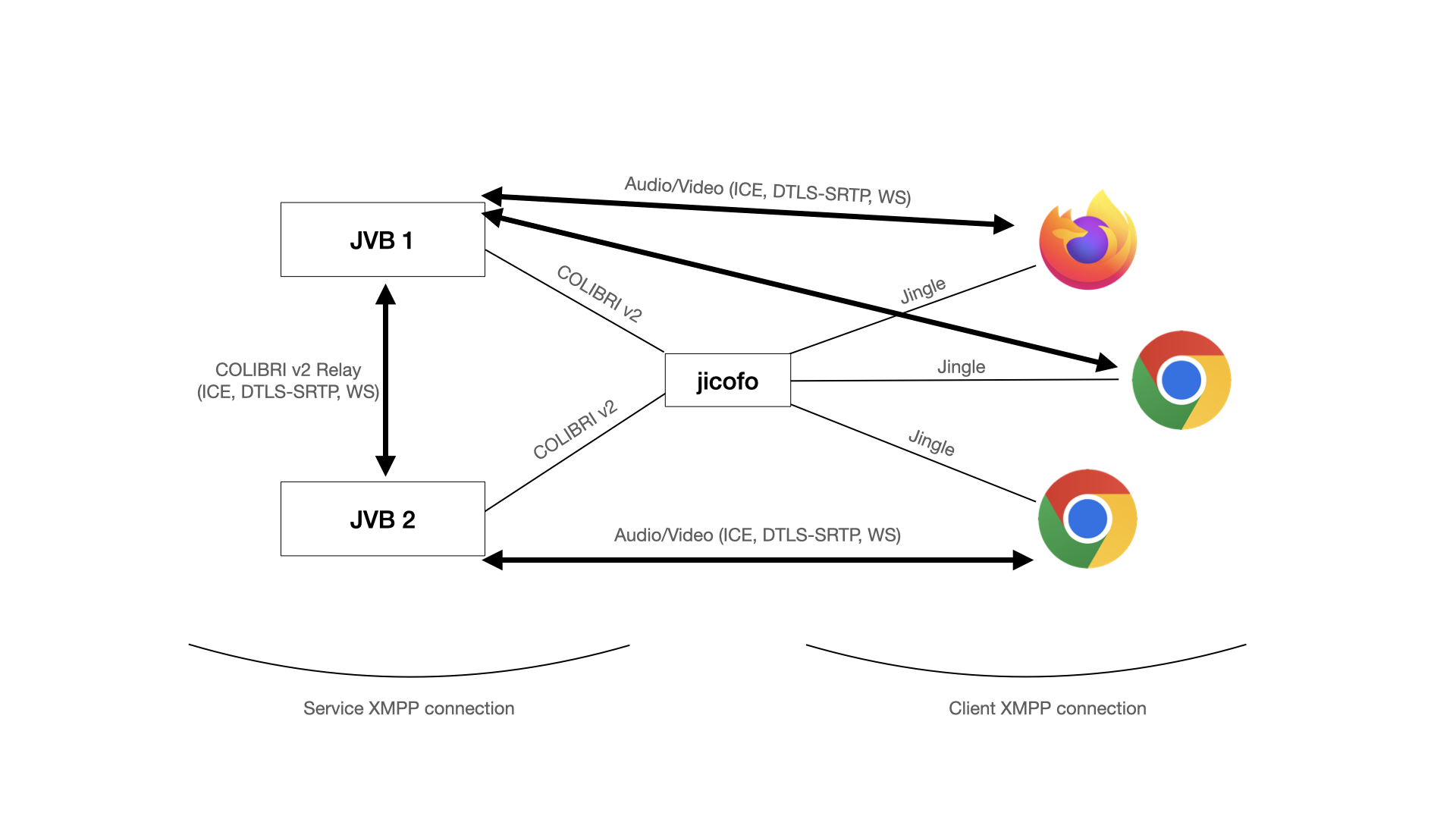
Jicofo joins the conference MUC and is then responsible for initiating a Jingle session with each participant (in this sense it is the "focus" of the conference, which is where its name comes from). While Jicofo manages and terminates Jingle sessions, it does not process any of the media (audio/video). Instead, it uses one or more Jitsi Videobridge. instances.
Jicofo is responsible for selecting a Jitsi Videobridge for each participant, and manages the set of videobridges for the conference with the COLIBRI protocol (colibri version 2 is now used, the format in XEP-0340 is now deprecated).
In general the conference participants and videobridge instances are accessed through different XMPP connections -- the configured Client and Service connections, respectively, though they may coincide.
Jicofo takes its configuration from a hocon config file,
usually installed in /etc/jitsi/jicofo/jicofo.conf. See the
reference.conf file
for the available options.
The recommended way to install Jicofo and Jitsi Meet is to follow the Quick Install Guide for debian-based systems.
You can download Debian/Ubuntu binaries here:
Jicofo is available as a docker image as part of docker-jitsi-meet.
This section is only required for a manual setup, not necessary when using Quick Install or other methods.
Jicofo requires special 'owner' permissions in XMPP Multi User Chat to manage user roles. Because of that it needs administrator credentials to start. By default, Jitsi Meet uses XMPP domain with anonymous login method (jitsi.example.com), so additional VirtualHost has to be added to Prosody configuration(etc\prosody\prosody.cfg.lua):
VirtualHost "auth.jitsi.example.com"
    authentication = "internal_hashed"
The next step is to create an admin user for Jicofo:
sudo prosodyctl register focus auth.jitsi.example.com focuspassword
Include focus user as one of server admins:
admins = { focus@auth.jitsi.example.com }
Restart Prosody:
sudo prosodyctl restart
Build using maven with:
mvn install
This will create a package in jicofo/target/jicofo-1.1-SNAPSHOT-archive.zip
Extract the distribution package and run with jicofo.sh.
Jicofo uses an XMPP user connection (on port 5222 by default), and since the upgrade to smack4 it verifies the server's certificate. In a default installation the debian installation scripts take care of generating a self-signed certificate and adding it to the keystore.
For situations in which the certificate is not trusted you can add it to the store by:
sudo cp cert.pem /usr/local/share/ca-certificates/
sudo update-ca-certificates
On Mac java uses its own keystore, so adding the certificate to the system one does not work. Add it to the java keystore with:
sudo keytool -importcert -file cert.pem -keystore /Library/Java//JavaVirtualMachines/jdk1.8.0_25.jdk/Contents/Home/jre/lib/security/cacerts
Note that if the XMPP server you are connecting to is a prosody instance configured with the jitsi-meet scripts, then you can find the certificate in:
/var/lib/prosody/$JICOFO_AUTH_DOMAIN.crt