

R-Drive Image is an advanced utility providing disk image file creation for backup or duplication purposes. A disk image file contains the exact, byte-by-byte copy of a hard drive, partition, or logical disk and can be created with various compression levels on the fly without stopping Windows OS. These drive image files can then be transferred to various storage media such as CD-R(W)/DVD, Iomega Zip or Jazz disks, or another hard drive.
With R-Drive Image, users can:
- Create complete system backups for disaster recovery.
- Clone disks for upgrading to a larger drive.
- Restore systems after crashes or malware attacks.
- Schedule automatic backups to ensure data safety.
The software is widely used by IT professionals, system administrators, and home users who need reliable data protection. Its ability to work while Windows is running makes it exceptionally convenient for continuous system operation without downtime.
R-Drive Image supports all major file systems including FAT12, FAT16, FAT32, NTFS, NTFS5, NTFS/EFS, Linux Ext2, Ext3, Ext4, ReiserFS, and Apple HFS+ file systems. Whether you're protecting critical business data or personal files, R-Drive Image offers a comprehensive solution for all your backup needs.
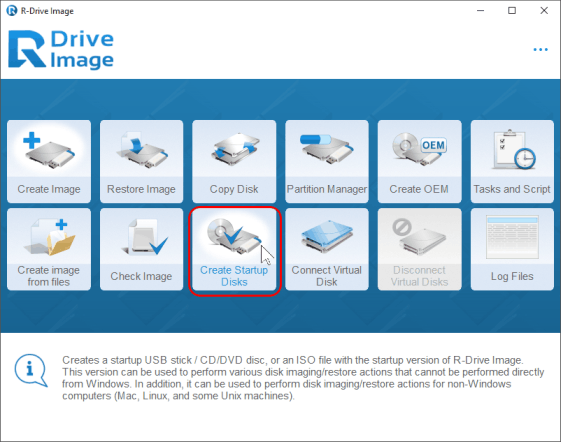
| Feature | Description |
|---|---|
| 📀 Disk Imaging | Create exact byte-by-byte copies of hard drives and partitions. |
| 🔄 Live Backup | Perform backups without stopping Windows or interrupting work. |
| ⏰ Scheduled Backups | Automate backup tasks with flexible scheduling options. |
| 💾 Compression Options | Multiple compression levels to save storage space. |
| 🔒 Encryption Support | Protect backups with strong encryption algorithms. |
| 🖥 System Restoration | Restore entire systems from image files quickly and reliably. |
| 💽 Disk Cloning | Clone disks for migration or upgrading to larger drives. |
| 🌐 File System Support | Works with FAT12, FAT16, FAT32, NTFS, Ext2/3/4, and more. |
| 🛡️ Data Protection | Ensure business continuity and data safety with reliable backups. |
- Enhanced Windows 11 compatibility
- Improved compression algorithms for faster backups
- Better support for large capacity drives
- Enhanced encryption security features
- Updated user interface for improved usability
- Fixed various minor bugs and stability issues
- System Administrators – Maintain system backups for quick disaster recovery
- IT Professionals – Clone multiple workstations with identical configurations
- Home Users – Protect personal data from hardware failures
- Businesses – Ensure business continuity with reliable backup solutions
- Gamers – Backup game installations and save files
- Developers – Create development environment snapshots
- Download R-Drive Image from the official website or repository
- Install and launch the application
- Select the source drive or partition for imaging
- Choose destination for the image file
- Configure compression and encryption settings
- Start the imaging process
- Use the image for restoration when needed
| Parameter | Requirement |
|---|---|
| OS | Windows 7/8/10/11 (32-bit or 64-bit) |
| Processor | 1 GHz Intel/AMD or higher |
| RAM | 512 MB (1 GB recommended) |
| Storage | 50 MB for installation + space for images |
| Other | Administrative privileges required |
r-drive image backup • r-drive image recovery • r-drive image software • r-drive image windows • r-drive image utility • r-drive image solution • r-drive image professional • r-drive image personal • disk imaging software • backup software windows • drive cloning tool • system backup utility • partition backup • data protection software • windows backup tool • disaster recovery software • disk image creator • file backup solution • hard drive backup • system migration tool • backup and recovery • disk duplication • image backup software • backup compression • encrypted backups • scheduled backups • automatic backup • reliable backup software