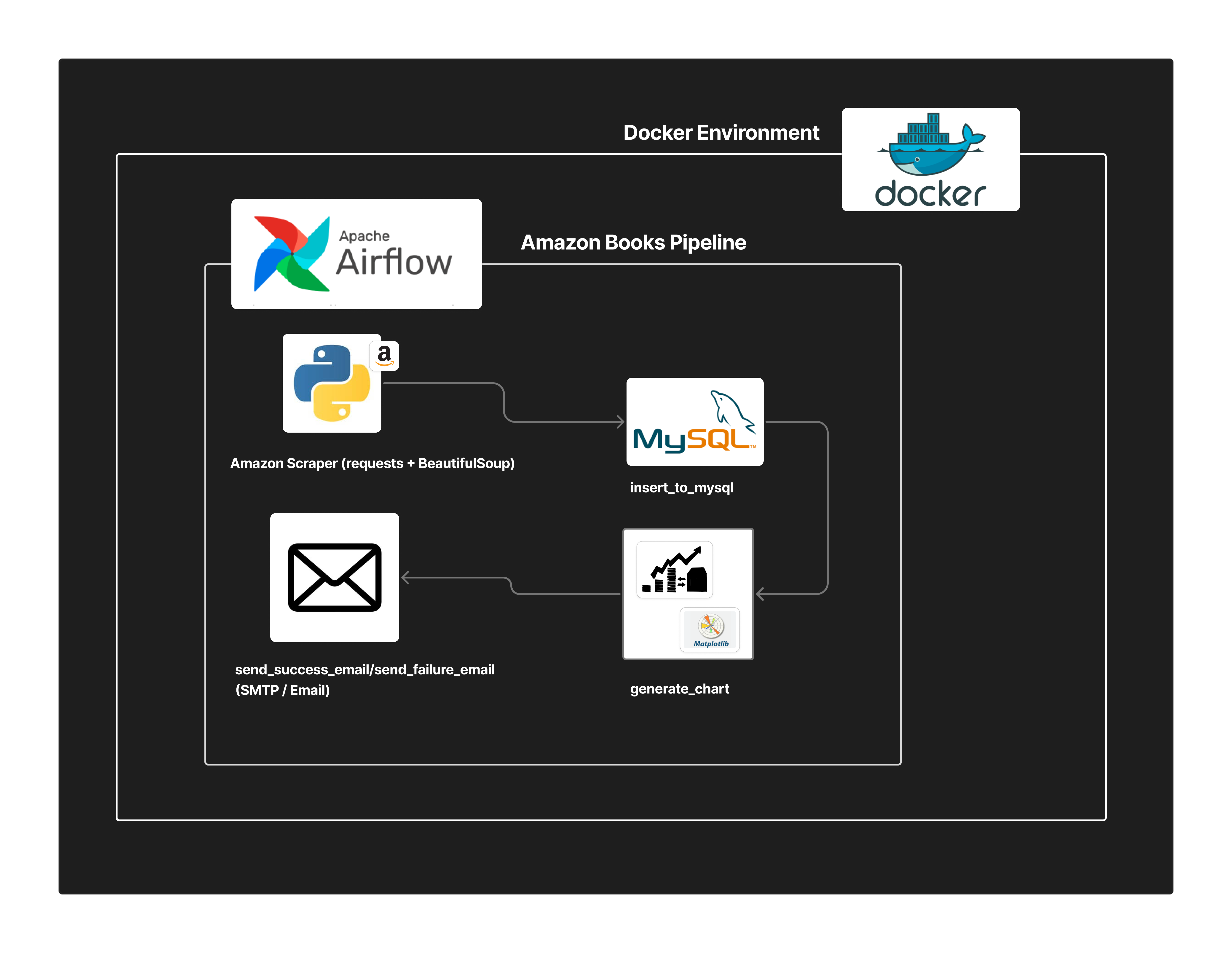
This project automates the fetching, cleaning, transforming, and storing of Amazon Books data using Apache Airflow running inside Docker Compose.
- Automated Airflow DAG for fetching, cleaning, transforming, and inserting book data
- Data Cleaning
- Remove duplicates
- Convert ratings to float
- Add
recommended_flagcolumn (Yes/No)
- MySQL Storage for structured book data
- Email Notifications on success/failure
- Visualization Output →
/tmp/top_books.png - Fully containerized using Docker Compose (Airflow + MySQL + Postgres + Redis)
Amazon Books → Airflow DAG → MySQL → Visualization → Email Notification
Inside Docker:
- Airflow Webserver
- Airflow Scheduler
- MySQL
- PostgreSQL (Airflow metadata)
- Redis
fetch_with_docker/
├── dags/                # Airflow DAG definitions
├── assets/              # Architecture diagrams (e.g., .png)
├── docker-compose.yml   # Docker services configuration
├── requirements.txt     # Python dependencies
└── README.md # This documentbash
docker-compose up --build -d- URL: http://localhost:8080
- Credentials:
user: airflow
password: airflow
- Open Airflow UI
- Look for:
amazon_books_pipeline - Turn it ON
- Click Trigger DAG
| Column | Type | Description |
|---|---|---|
| id | INT | Primary key |
| title | VARCHAR | Book title |
| author | VARCHAR | Book author |
| rating | FLOAT | Cleaned rating |
| recommended_flag | VARCHAR(3) | Yes / No |
- fetch_book_data → Fetch from Amazon
- clean_transform_data → Process dataframe
- insert_into_mysql → Store into MySQL
- generate_visualization → Save
/tmp/top_books.png - send_email_notification → SMTP email
In Airflow UI:
- Go to Admin → Connections
- Add:
Conn ID: mysql_default
Conn Type: MySQL
Host: mysql
Login: root
Password: root
Schema: books_db
Port: 3306
Set in docker-compose.yml:
AIRFLOW__SMTP__SMTP_HOST=smtp.gmail.com
AIRFLOW__SMTP__SMTP_USER=your_email@gmail.com
AIRFLOW__SMTP__SMTP_PASSWORD=your_app_passworddocker-compose downReset everything:
docker-compose down -v- Email not working → verify Gmail App Password
Rawan Nada
Email: rwannada22@gmail.com
LinkedIn: https://www.linkedin.com/in/rawan-nada-a63994281