Releases: StuartCameronCode/VapourBox
VapourBox 0.5.3

Changes
- Fixed bugs and added more options to compression codecs, including ffmpeg overrides
- Add zoom & pan support to the preview window
- Disable bilinear filtering on split preview for pixel-accurate zoom
- Fixed progress tracking of processing jobs (this was a deep rabbit hole!)
- DMG based distribution for MacOS builds, fixes symlink issues with rhttp library
Downloads
macOS: VapourBox-0.5.3-macos-arm64.dmg
Windows: VapourBox-0.5.3-windows-x64.zip
Dependencies (~185 MB) are downloaded automatically on first launch.
Uses dependency release: deps-v1.0.0
Dependencies v1.1.0
Dependencies v1.1.0
Changes from v1.0.0
- Added VIVTC.dll plugin (inverse telecine - VFM field matching + VDecimate)
Platforms
- Windows x64
- macOS x64 (pending)
VapourBox 0.5.2
Changes
- Update to try to track down dependency resolution issues. For diagnostics on MacOS launch from the terminal with
/Applications/VapourBox.app/Contents/MacOS/vapourbox. - Fix macOS dependency detection after extraction
- Ad-hoc codesign all dylibs and executables after dependency download (fixes Gatekeeper blocking on macOS Sequoia+)
- Add
python/libtoDYLD_LIBRARY_PATHto match Rust worker environment - Set
PYTHONNOUSERSITE=1to prevent user site-packages interference
- Add diagnostic logging to ToolLocator for easier debugging
Uses dependencies from: deps-v1.0.0
VapourBox 0.5.1
Changes
- Fix hardware codec determination, show all hardware codecs and warn about the unsupported ones
- Centralize tool path management, fix warnings
- Bug fixes and improvements
Dependencies
Uses dependencies from deps-v1.0.0 (auto-downloaded on first launch).
VapourBox 0.5.0
What's New
Hardware Encoding Support
- Added support for hardware-accelerated encoding: NVENC (NVIDIA), QSV (Intel), VideoToolbox (macOS), AMF (AMD)
Audio & Encoding Improvements
- Audio mode selection (copy, transcode, or remove)
- Chroma subsampling options
- Codec and pixel format info in video info dialog
Quality of Life
- Videos can now be re-processed without restarting the app
Dependencies
Uses existing dependency release: deps-v1.0.0
Full Changelog
- Add hardware encoding support (NVENC, QSV, VideoToolbox, AMF)
- Add audio mode selection, chroma subsampling, and integration tests
- Add codec and pixel format info to video info dialog
- Document macOS build workaround and release packaging requirements
VapourBox 0.4.0
What's New
Processing Improvements
- Batch processing fix: Fixed race condition in batch processing queue
- Re-process videos: Videos can now be re-processed without restarting the app
- Overwrite confirmation: Added confirmation dialog when output file already exists
Video Info
- Codec and pixel format info: Video info dialog now shows codec name and pixel format details
Auto-Updates
- Update checker: App now checks for updates on startup and notifies when a new version is available
Full Changelog: v0.3.0...v0.4.0
Dependencies: Uses deps-v1.0.0 (auto-downloaded on first run)
VapourBox 0.3.0
What's New
Video Queue
- Batch processing: Add multiple videos to a queue for sequential processing
- Process your entire collection without manual intervention
Output Configuration
- Custom output directory: Choose where processed videos are saved
- Filename patterns: Configure output filenames with variables like
{original},{date}, etc.
Compatibility
- NTSC DV support: Automatically convert 4:1:1 chroma to 4:2:2 for filter compatibility
Full Changelog: https://github.com/StuartCameron/VapourBox/compare/v0.2.1...v0.3.0
Dependencies: Uses deps-v1.0.0 (auto-downloaded on first run)
🤖 Generated with Claude Code
VapourBox 0.2.1
What's New
Bug Fixes & Improvements
- Fix preview generation working directory for dependency paths
- Add delay before worker exit to ensure completion message is received
- Remove legacy qtgmc_template fallback and fix dev path security
- Add audio codec compatibility warning dialog and full E2E tests
- Document dev vs production build strategy for dependency location
macOS
- Build for Apple Silicon (arm64) only - Intel Mac support removed
- Fixed release script version parsing
Downloads
- macOS (Apple Silicon):
VapourBox-0.2.1-macos-arm64.zip(~32 MB) - Windows (x64):
VapourBox-0.2.1-windows-x64.zip(~32 MB)
Installation
macOS
- Download and unzip
VapourBox-0.2.1-macos-arm64.zip - Move
VapourBox.appto your Applications folder - On first launch, dependencies (~94 MB) will be downloaded automatically
Windows
- Download and unzip
VapourBox-0.2.1-windows-x64.zip - Run
vapourbox.exe - On first launch, dependencies (~185 MB) will be downloaded automatically
Dependencies
Uses dependencies from: deps-v1.0.0
VapourBox 0.2.0
VapourBox 0.2.0
Cross-platform video restoration application using VapourSynth.
Changes
- Switch from http to rhttp for Windows certificate support
- Security: Only check development paths in debug builds
- Fix macOS deps storage location to use Application Support
- Reorganize Settings dialog into Input and Output tabs
- Update README with screenshot and improved description
Downloads
| Platform | Download |
|---|---|
| macOS (Apple Silicon) | VapourBox-0.2.0-macos-arm64.zip |
| Windows (x64) | VapourBox-0.2.0-windows-x64.zip |
Installation
- Download the zip for your platform
- Extract and run the app
- Dependencies (~100-180 MB) will be automatically downloaded on first launch
Note: Uses dependencies from deps-v1.0.0
🤖 Generated with Claude Code
VapourBox 0.1.0
A user-friendly wrapper for VapourSynth that makes video processing accessible to everyone.
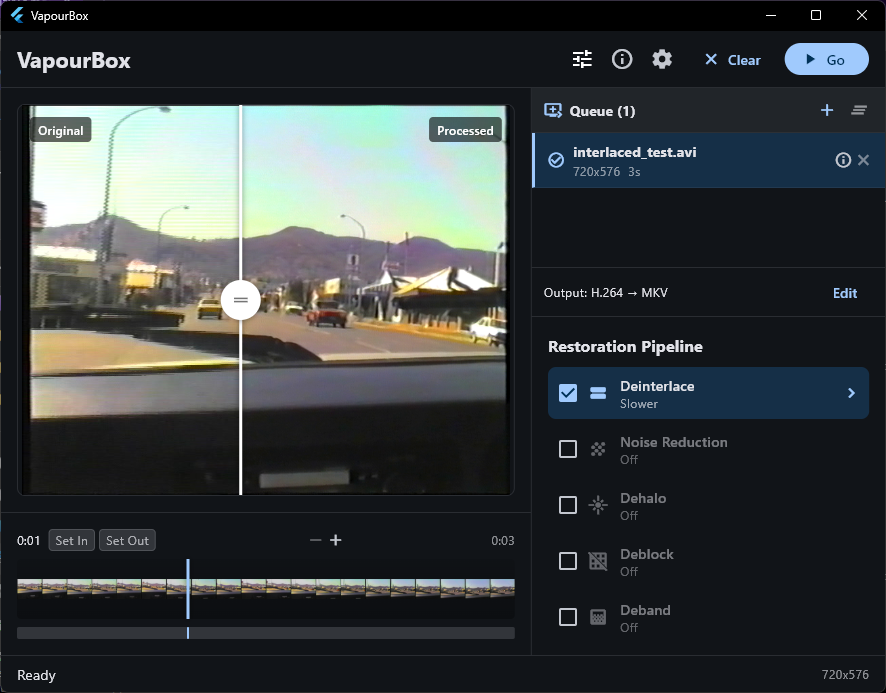
What is VapourBox?
VapourBox provides a simple drag-and-drop interface for powerful video processing tasks that normally require scripting knowledge. Convert interlaced footage, apply QTGMC deinterlacing, reduce noise, and fix common video problems—no command line needed.
Features
- QTGMC deinterlacing - Industry-standard deinterlacing with full parameter control
- Multi-pass restoration pipeline - Denoise, sharpen, dehalo, deblock, deband
- Real-time preview - Side-by-side before/after comparison
- Timeline with zoom - Navigate and set in/out points for partial exports
- Multiple output codecs - ProRes, FFV1, H.264, H.265
- Preset system - Save and reuse your filter configurations
Use Cases
- Convert interlaced video to progressive
- Clean up noisy or soft footage
- Archive DVDs with proper deinterlacing
- Restore VHS captures
Platforms
- macOS ARM64 (Apple Silicon)
- Windows x64
Installation
- Download the zip for your platform
- Extract and run
- Dependencies (~94 MB macOS, ~183 MB Windows) download automatically on first launch
Requirements
- macOS 11+ (Apple Silicon) or Windows 10/11 (x64)
- Internet connection for first launch