
A beginner-friendly npm CLI that scaffolds Express APIs with best-practice structure and optional educational comments.
Most Express projects require some initial setup, including folders, middleware, error handling, and testing. This CLI tool automates this process so you can start writing routes immediately. It includes a standard, readable codebase with a pre-configured Jest and Supertest suite that passes right out of the box.
The CLI offers multiple configuration options to suit different preferences and use cases, including:
- JavaScript or TypeScript
- Simple or MVC architecture
- In-memory or PostgreSQL (local
psqlor Docker) - npm workflow (
npm create,npm init, ornpx) - Dependency installs with
npmoryarn
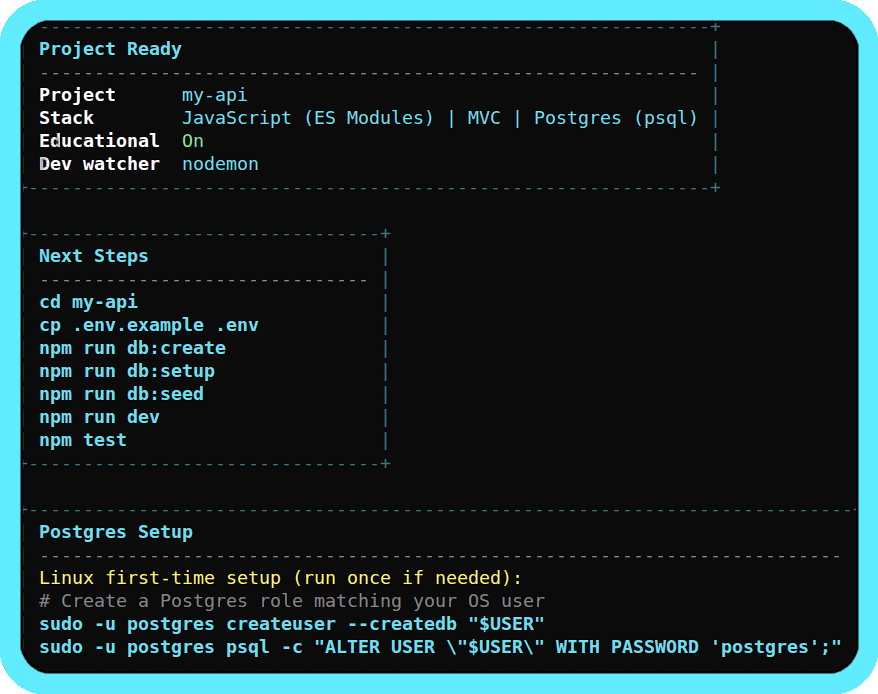
The CLI works on Linux, macOS, and Windows.
- About
- Table of contents
- Installation
- Usage examples
- How it works
- Options
- What gets generated
- Database modes
- Educational comments
- Design decisions
- Requirements
- Built with
- Contributing
- Licence
npm create @alexmc2/express-api-starter@latest my-apinpm init @alexmc2/express-api-starter my-apinpx @alexmc2/create-express-api-starter my-apinpm install -g @alexmc2/create-express-api-starternpm create @alexmc2/express-api-starter@latestnpm create @alexmc2/express-api-starter@latest my-api -- --yesnpm create @alexmc2/express-api-starter@latest my-api -- --dry-runThen:
cd my-api
cp .env.example .env
npm run dev    # Start the dev server
npm test       # Run the test suite
npm run lint   # Run ESLint
To use Yarn for dependency installation and command examples shown by the CLI:
npm create @alexmc2/express-api-starter@latest my-api -- --package-manager=yarnYour API is live at http://localhost:3000. Go to http://localhost:3000/health to confirm.
The interactive CLI prompts you for configuration preferences and generates your project files from templates.
When you run npm create @alexmc2/express-api-starter@latest my-api, npm downloads the CLI to build the project directly in your folder. You are left with a standalone Express API with its own scripts and tests, and the generated project has no ongoing dependency on this tool. You can safely uninstall the CLI globally if you used that installation method.
The CLI walks you through these choices interactively. Use --yes to skip prompts and accept all defaults.
| Option | Choices | Default |
|---|---|---|
| Language | JavaScript, TypeScript | JavaScript |
| Module system (JS only) | CommonJS, ES Modules | CommonJS |
| Dev watcher (JS only) | node --watch, nodemon |
node --watch |
| Architecture | Simple (flat), MVC (layered) | Simple |
| Database | In-memory, Postgres (psql), Postgres (Docker) | In-memory |
| Educational comments | On, Off | On |
| Install dependencies | Yes, No | Yes |
| Package manager | npm, yarn | npm |
| Initialise git repo | Yes, No | Yes |
| Flag | Effect |
|---|---|
--yes |
Accept all defaults, skip prompts |
--dry-run |
Show the generation plan without writing files |
--no-install |
Skip dependency installation after generation |
--no-git |
Skip git init after generation |
--verbose |
Show full dependency install output instead of quiet mode |
--package-manager=<name> |
Choose dependency installer: npm or yarn |
--pm <name> |
Alias for --package-manager |
--yarn |
Shortcut for --package-manager=yarn |
my-api/
├── src/
│   ├── app.js              # Express app: middleware, routes, error handling
│   ├── server.js           # Starts the server on PORT
│   ├── routes/
│   │   ├── health.js       # GET /health
│   │   └── users.js        # GET & POST /api/users
│   ├── utils/
│   │   └── getPort.js      # PORT parsing helper
│   ├── errors/
│   │   └── AppError.js     # Custom error class
│   └── middleware/
│       ├── notFound.js     # 404 handler
│       └── errorHandler.js # Centralised error handler
├── __tests__/
│   └── app.test.js         # Health check and users endpoint tests
├── .env.example
├── .gitignore
├── .eslintrc.cjs
├── package.json
├── README.md
└── jest.config.js
The MVC option organises the code into controllers/, services/, and repositories/ to keep the business logic and data access separate.
Postgres modes additionally include db/schema.sql, db/seed.sql, src/db/ (connection pool), and setup scripts in scripts/. Docker mode adds a compose.yaml.
The following middleware is pre-configured in every project:
- express.json() - parses JSON request bodies
- cors - enables cross-origin requests
- helmet - sets security-related HTTP headers
- morgan - logs HTTP requests in dev format
- dotenv - loads environment variables from
.env
Errors return a consistent JSON shape:
{
  "status": 404,
  "message": "Resource not found"
}
In development, a stack trace is included for debugging. This is omitted in production.
In PostgreSQL mode, duplicate values for unique fields (like email) return 409 Conflict with a clear message instead of a generic 500.
JavaScript projects:
| Script | Command | Purpose |
|---|---|---|
npm run dev |
node --watch src/server.js or nodemon src/server.js |
Dev server with auto-restart |
npm start |
node src/server.js |
Production start |
npm test |
jest (CJS) or node --experimental-vm-modules ... jest (ESM) |
Run test suite |
npm run lint |
eslint . |
Lint source files |
Choosing nodemon adds it to devDependencies automatically.
TypeScript projects:
| Script | Command | Purpose |
|---|---|---|
npm run dev |
tsx watch src/server.ts |
Dev server with auto-restart |
npm run build |
tsc |
Compile to JavaScript |
npm start |
node dist/server.js |
Production start (compiled) |
npm test |
jest |
Run test suite |
npm run lint |
eslint . --ext .ts |
Lint source files |
Postgres modes also include:
| Script | Purpose |
|---|---|
npm run db:create |
Create the database (psql mode only) |
npm run db:setup |
Apply db/schema.sql |
npm run db:seed |
Insert sample data from db/seed.sql |
npm run db:reset |
Drop and recreate tables, then re-seed |
npm run db:up |
Start the PostgreSQL container (Docker mode only) |
npm run db:down |
Stop and remove the container (Docker mode only) |
The project includes a functional test suite using Jest and Supertest. In-memory mode works out of the box - just run npm test immediately after generation.
Data is stored in a simple JavaScript array, so you don't need to install or configure anything. This is useful for prototyping, though data will reset every time the server restarts. Because the project uses a repository pattern, you can swap this for a real database later without having to refactor your routes.
If you have PostgreSQL running locally, this mode sets up everything you need to connect your app to a real database. The generated project includes:
pg(node-postgres) with a pre-configured connection pool.db/schema.sqlanddb/seed.sqlfor your initial tables and test data.- Management scripts (
db:setup,db:reset, etc.) so you don't have to jump into the terminal to run SQL manually. - A
DATABASE_URLin your.envpre-filled with your OS username and a database name derived from your project.
To get started:
# After generation
npm run db:create   # Create the database
npm run db:setup    # Create tables
npm run db:seed     # Insert sample data
npm run dev         # Start the server
The generated README includes OS-specific PostgreSQL installation and role setup instructions.
If you prefer Docker to avoid a local installation, this mode provides a compose.yaml that runs PostgreSQL on port 5433 (avoiding conflicts with any local Postgres you might have).
It includes a retry helper in the setup scripts. This solves the common issue where scripts fail because the database container isn't fully "ready" to accept connections yet.
# After generation
npm run db:up       # Start PostgreSQL container
npm run db:setup    # Create tables (retries until DB is ready)
npm run db:seed     # Insert sample data
npm run dev         # Start the server

# When done
npm run db:down # Stop and remove container + dataYou can enable inline comments that explain the 'why' behind the code. These are designed to be short and useful, covering things like:
- Why we use
express.json()and what happens if you forget it. - Why
helmetis included for security. - How the repository pattern simplifies your data logic.
Opinionated but swappable. The tool uses a standard stack (Jest, Morgan, Helmet, and ESLint) so projects are functional immediately. There is no complex logic connecting these tools, so they are easy to swap out if a different library is preferred.
Module system choice. JavaScript projects allow choosing between CommonJS and ES Modules. TypeScript projects use ESM-style imports that compile to clean CommonJS.
Auth, ORMs, and OpenAPI. These are not included in the current templates. Since these are major architectural decisions, they are best left to the developer to decide based on specific project needs. These may be added as configurable options in later versions.
- Node.js >= 20
- npm (comes with Node)
- Docker (only if using Docker DB mode)
- PostgreSQL (only if using local psql mode)
The CLI itself:
- TypeScript + ESM, built with tsup
- @clack/prompts for interactive UI
- EJS for template rendering
- Vitest for the CLI's own tests
Generated projects use:
- Express 5
- Jest + Supertest for testing
- ESLint for linting
@swc/jestfor TypeScript test transformspgfor PostgreSQL (when applicable)
If you find a bug or have an idea for a template, feel free to open an issue or a PR. See CONTRIBUTING.md for details.
git clone https://github.com/alexmc2/create-express-api-starter.git
cd create-express-api-starter
npm install
npm test          # Run all tests (unit + integration)
npm run test:unit # Run unit tests only
npm run build     # Build the CLI
npm run dev -- my-test-project  # Run from source
The test suite includes integration tests that generate real projects across all variant combinations, install dependencies, run their test suites, and run their linters.
MIT