




A production-ready Blazor Server application template built on Clean Architecture principles, offering advanced code generation, AI-assisted development workflows, and enterprise-grade capabilities for building scalable and maintainable systems.
This repository provides a production-grade Blazor Server solution template designed in strict accordance with Clean Architecture principles and modern enterprise application standards.
Built on .NET 10, the template demonstrates a well-structured, scalable, and maintainable architecture for developing complex business systems. It integrates advanced code generation capabilities, AI-assisted development workflows, and specification-driven design patterns, enabling teams to accelerate development while preserving architectural consistency and code quality.
This project has officially said goodbye to MediatR and AutoMapper, replacing them with Mediator and Mapster for a simpler and more modern architecture.
The solution is intended to serve both as a reference implementation for Blazor Clean Architecture best practices and as a ready-to-use foundation for enterprise-level applications that require long-term maintainability, extensibility, and high development efficiency.
- 🏗️ Clean Architecture: Strict layer separation with dependency inversion
- 🎨 Modern UI: Beautiful, responsive interface built with MudBlazor
- ⚡ Real-time Communication: SignalR integration for live updates
- 🔐 Enterprise Security: Multi-factor authentication, role-based access control
- 🌐 Multi-tenancy: Built-in tenant isolation and management
- 📊 Advanced Data Grid: Sorting, filtering, pagination, and export capabilities
- 🎨 Code Generation: Visual Studio extension for rapid development
- 🔄 Modern Application Pipeline:
MediatorandMapsterreplace the previousMediatRandAutoMapperstack - 🐳 Docker Ready: Complete containerization support
- 📱 Progressive Web App: PWA capabilities for mobile experience
Experience the application in action:

Live Demo: architecture.blazorserver.com

Enabling collaboration between employers, suppliers, and HR management with integrated attendance, work hours, and billing in a seamless online closed loop.
 BLAZOR PARKING SYSTEM - GitHub | Live Demo
 HSE Management System - GitHub | Live Demo
 EU Digital Product Passport - Live Demo
| Layer | Technologies |
|---|---|
| Frontend | Blazor Server, MudBlazor, SignalR |
| Backend | .NET 10, ASP.NET Core, Mediator, Mapster, FluentValidation |
| Database | Entity Framework Core, MSSQL/PostgreSQL/SQLite |
| Authentication | ASP.NET Core Identity, OAuth 2.0, JWT |
| Caching | FusionCache, Redis |
| Background Jobs | Hangfire |
| Testing | xUnit, FluentAssertions, Moq |
| DevOps | Docker, GitHub Actions |
┌─────────────────┐    ┌─────────────────┐    ┌─────────────────┐
│   Server.UI     │    │  Application    │    │     Domain      │
│   (Blazor)      │───▶│   (Business)    │───▶│   (Entities)    │
└─────────────────┘    └─────────────────┘    └─────────────────┘
         │                        │
         │              ┌─────────────────┐
         └─────────────▶│ Infrastructure  │
                        │   (Data/IO)     │
                        └─────────────────┘
- Domain: Core business entities and rules (no dependencies)
- Application: Business logic, interfaces, and DTOs
- Infrastructure: External concerns (database, email, file system)
- Server.UI: Blazor components and user interface
The project includes a comprehensive Development Workflow with:
- Task Management: Structured approach to feature development
- Code Review Guidelines: Quality assurance processes
- Testing Strategies: Unit and integration testing patterns
- Deployment Procedures: CI/CD pipeline configurations
- .NET 10 SDK
- Visual Studio 2022 or Rider
- Docker Desktop (optional)
-
Install the Template
dotnet new install CleanArchitecture.Blazor.Solution.Template
-
Create New Project
dotnet new ca-blazorserver-sln -n YourProjectName cd YourProjectName -
Setup Database
dotnet ef migrations add InitialCreate --project src/Migrators/Migrators.MSSQL --startup-project src/Server.UI --context ApplicationDbContext
-
Run the Application
dotnet run --project src/Server.UI
-
Access the Application
- Navigate to
https://localhost:7152 - Login with default credentials (see documentation)
- Navigate to
Run with configured database provider (In-Memory removed):
docker run -p 8443:443 \
  -e DatabaseSettings__DBProvider=mssql \
  -e DatabaseSettings__ConnectionString="Server=127.0.0.1;Database=BlazorDashboardDb;User Id=sa;Password=<YourPassword>;MultipleActiveResultSets=true;Encrypt=false;TrustServerCertificate=false" \
  blazordevlab/cleanarchitectureblazorserver:latest
Production Setup (docker compose):
docker-compose up -dSee Docker Setup Documentation for detailed configuration.
- Architecture Guide: Detailed architecture explanation
- Development Workflow: Step-by-step development process
- API Documentation: Complete API reference
- Deployment Guide: Production deployment instructions
- Contributing Guidelines: How to contribute to the project
This repository recommends using the content under docs/superpowers/ for design notes, implementation plans, and workflow guidance when a change needs more than a quick edit.
- Explore the existing implementation first.
Review similar features in
src/Application/Features, related UI pages insrc/Server.UI, and the current setup instructions inREADME.md. - Write down design or planning notes when the task is non-trivial.
Store them under
docs/superpowers/specs/ordocs/superpowers/plans/. - Implement by following existing repository patterns. Reuse the Contacts-style module structure, current pipeline behaviors, validation approach, and navigation conventions where applicable.
- Verify the change before finishing. Run the relevant build and test commands, then update documentation if setup or workflow steps changed.
- Use existing modules as the reference implementation for structure and conventions.
- Add menu entries in
src/Server.UI/Services/Navigation/MenuService.cs. - Define permissions under
Permissions.<Module>so they are included during seeding. - For data access in handlers, prefer the current per-operation context lifetime patterns already used in the repository.
Accelerate development with the Visual Studio extension:
- CleanArchitecture CodeGenerator
- Automatically generates layers for new entities
- Maintains architectural consistency
- Reduces boilerplate code by 80%
2022.mp4
| Database | Provider Name | Status |
|---|---|---|
| SQL Server | mssql |
✅ Fully Supported |
| PostgreSQL | postgresql |
✅ Fully Supported |
| SQLite | sqlite |
✅ Fully Supported |
Configure in appsettings.json:
{
  "DatabaseSettings": {
    "DBProvider": "mssql",
    "ConnectionString": "Server=localhost;Database=YourDb;Trusted_Connection=true;"
  }
}Configure OAuth providers in appsettings.json:
- Microsoft: Setup Guide
- Google: Setup Guide
- Facebook: Setup Guide
- Twitter: Setup Guide
docker pull blazordevlab/cleanarchitectureblazorserver:latestFor Development:
docker run -p 8443:443 -e ASPNETCORE_ENVIRONMENT=Development -e ASPNETCORE_HTTPS_PORTS=443 \
  -e DatabaseSettings__DBProvider=mssql \
  -e DatabaseSettings__ConnectionString="Server=127.0.0.1;Database=BlazorDashboardDb;User Id=sa;Password=<YourPassword>;MultipleActiveResultSets=true;Encrypt=false;TrustServerCertificate=false" \
  blazordevlab/cleanarchitectureblazorserver:latest
For Production (Persistent Database and SMTP Configuration):
docker run -d -p 8443:443 \
-e ASPNETCORE_ENVIRONMENT=Development \
-e ASPNETCORE_HTTP_PORTS=80 \
-e ASPNETCORE_HTTPS_PORTS=443 \
-e DatabaseSettings__DBProvider=mssql \
-e DatabaseSettings__ConnectionString="Server=127.0.0.1;Database=BlazorDashboardDb;User Id=sa;Password=<YourPassword>;MultipleActiveResultSets=true;Encrypt=false;TrustServerCertificate=false" \
-e SmtpClientOptions__User=<YourSMTPUser> \
-e SmtpClientOptions__Port=25 \
-e SmtpClientOptions__Server=<YourSMTPServer> \
-e SmtpClientOptions__Password=<YourSMTPPassword> \
-e Authentication__Microsoft__ClientId=<YourMicrosoftClientId> \
-e Authentication__Microsoft__ClientSecret=<YourMicrosoftClientSecret> \
-e Authentication__Google__ClientId=<YourGoogleClientId> \
-e Authentication__Google__ClientSecret=<YourGoogleClientSecret> \
-e Authentication__Facebook__AppId=<YourFacebookAppId> \
-e Authentication__Facebook__AppSecret=<YourFacebookAppSecret> \
blazordevlab/cleanarchitectureblazorserver:latestFor easier management, use a docker-compose.yml file:
version: '3.8'
services:
  blazorserverapp:
    image: blazordevlab/cleanarchitectureblazorserver:latest
    environment:
      - ASPNETCORE_ENVIRONMENT=Development
      - ASPNETCORE_URLS=http://+:80;https://+:443
      - ASPNETCORE_HTTP_PORTS=80
      - ASPNETCORE_HTTPS_PORTS=443
      - DatabaseSettings__DBProvider=mssql
      - DatabaseSettings__ConnectionString=Server=127.0.0.1;Database=BlazorDashboardDb;User Id=sa;Password=***;MultipleActiveResultSets=true;Encrypt=false;TrustServerCertificate=false
      - SmtpClientOptions__User=<YourSMTPUser>
      - SmtpClientOptions__Port=25
      - SmtpClientOptions__Server=<YourSMTPServer>
      - SmtpClientOptions__Password=<YourSMTPPassword>
      - Authentication__Microsoft__ClientId=<YourMicrosoftClientId>
      - Authentication__Microsoft__ClientSecret=<YourMicrosoftClientSecret>
      - Authentication__Google__ClientId=<YourGoogleClientId>
      - Authentication__Google__ClientSecret=<YourGoogleClientSecret>
      - Authentication__Facebook__AppId=<YourFacebookAppId>
      - Authentication__Facebook__AppSecret=<YourFacebookAppSecret>
    ports:
      - "8443:443"
    volumes:
      - files_volume:/app/Files

  mssql:
    image: mcr.microsoft.com/mssql/server:2022-latest
    environment:
      - ACCEPT_EULA=Y
      - SA_PASSWORD=YourStrongPassword!
    ports:
      - "1433:1433"
    volumes:
      - mssql_data:/var/opt/mssql

volumes:
  files_volume:
mssql_data:We welcome contributions! Please see our Contributing Guidelines for details.
- Fork the repository
- Create a feature branch
- Make your changes
- Add tests
- Submit a pull request
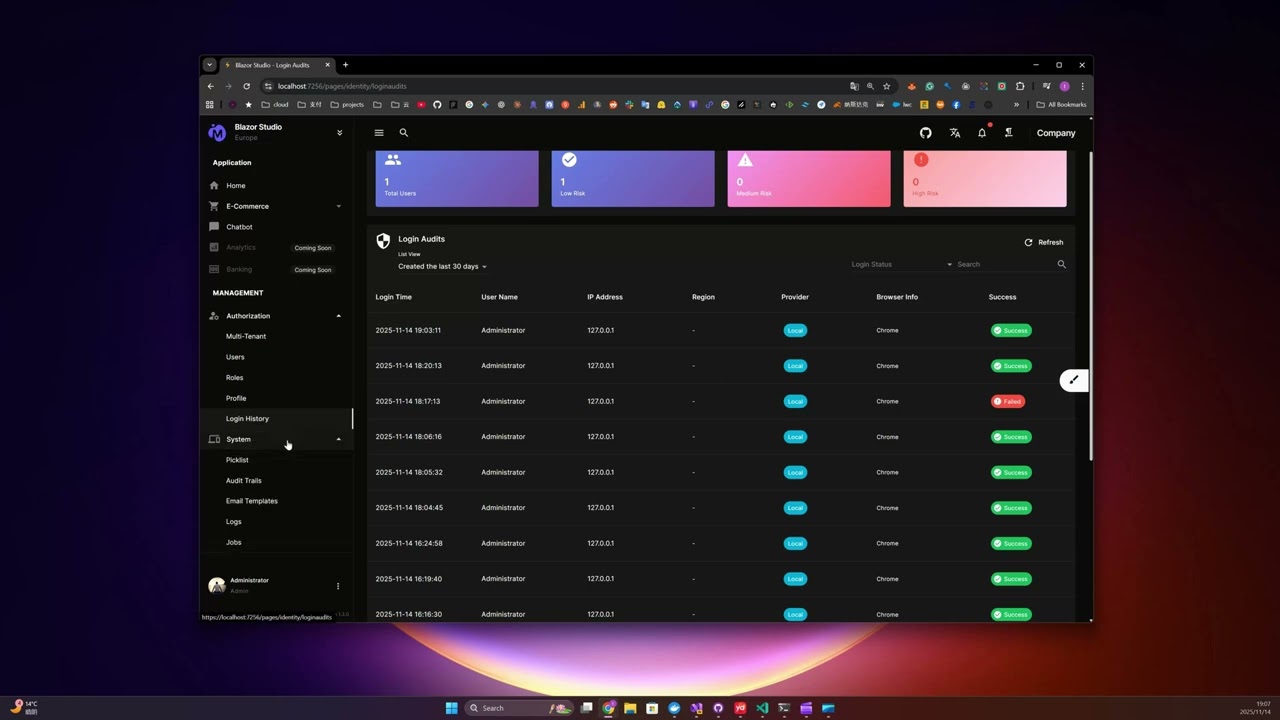
 Tutorial: Adding a Contact Entity
 Tutorial: Removing a Customer Object
- CleanAspire: Blazor WebAssembly version with .NET Aspire
- CleanArchitecture CodeGenerator: Visual Studio extension
Visit my website for more Blazor resources and professional services:
BlazorServer.com - Blazor Development Services & Resources
If this project helps you, please consider supporting its development:
- ⭐ Star this repository
- 🐛 Report issues
- 💡 Suggest features
- 💰 Sponsor: GitHub Sponsors | PayPal
Your support helps maintain and improve this project. Thank you! 🙏
This project is licensed under the MIT License - see the LICENSE file for details.
Built with ❤️ using Clean Architecture principles