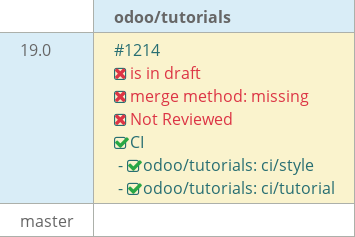
19.0 Global discount on purchase - pupat#1214
Draft
pupat-odoo wants to merge 19 commits intoodoo:19.0from
Draft
Conversation


- Created the core estate model and initialized database schema.
- Configured manifest with required metadata and dependencies.
- Handled code cleanup, including license headers and trailing spaces.
- Imported models into the root directory for proper initialization.
- It covers chapter-3 task
- added the required fields.
- Defined access control CSV in the security directory.
- Configured permissions for estate property records.
…ties.

- Added access rights for estate.property model.
- Ensured proper read/write/create/delete permissions.
…constraints.

- This file includes the model's  description.
- Included model description for clarity.
- Added list view to display records in tabular format.

- Added form view with grouped fields.

- Added search view with filter for 'Available' properties and group by postcode.
- used many2one relation in estate_property_type model, signifies
a property has individual type but may assigned to multiple other properties

- used Many2many relationship in estate_property_tag model,signifies a property has multiple tag but one tag can be assigned to multiple  properties.

- used One2many relationship in estate_property_offer model, signifies a property has multiple offer but each offers belongs to one property.
…ch-7)

- corrected the string datatype misspelling

-Changed the same name conflict between 'name' and 'property_type_id'.
…ver(ch-8)

- used compute method to specify the  relationship between fields.

- Inverse function allows to edit the read-only computed fields.

- Onchange method decorator dynamically changes other dependent field values.

This chapter covers the implementation of computed fields and Onchange decorator which allows to perform computations and defines the link between the fields.
…ch-9)

- By adding action buttons , it's easy to have link between fields.

UserError message helps  to get alert message about the actions already done.

This chapters allows us to link action to particular button such as:

Actions button to sold,refused (property) and accept or reject (offers).

User can also get   error message if they do some illogical action.
…rs(ch-10)

- Added constraints to ensure users can only enter valid and intended values.

- Implemented both SQL and Python constraints based on use case.

Types of constraints:

- SQL constraints: Used at database level for better performance with few logic.

- Python constraints: Used for complex business logic and advanced validation.
…vers(ch-11)

- Inline view allows users to create/edit related records  within  parent form.

- widget modifies how a field is rendered in UI without changing backend type.

- Decorators dynamically apply CSS styling to records based on conditions.

 created status widget for automatic state transactions.

- define One2many relationship to properties and a computed offer_count field.

- Added a smart button to provide contextual access to related records directly from the form view.

This change enables better categorization of properties and improves usability by allowing users to quickly access and analyze offers associated with each property type directly from the form view.
- CRUD opertions implemented using python inheritance.

- res_users model is created which inherits the estate model feature.

- It uses the same property list feature but of  specific  users such as admin.

- Main feature of inheritance is res_user is sychronized with base field values.
…unt (ch-13)

- Created estate_account module by inheriting estate_property model.

- Invoice generation enables customers to get the billing  details of property.

- invoice lines handles the commission and administrative fees.

This chapter covers the inheritance part and also delivers how different modules link  with each other.
- Qweb  template engine mostly used to generate HTML fragments and pages.

- used kanban view to give dynamic look to the property attributes.

- default_group_by attribute helps to filter the specfic property attributes.

- conditional statement also applied in the kanban view.

This chapter signifies the Qweb templating engine and the kanban visualization which represent the workflow stages allowing users to track progress drag-and-drop tasks to update statuses.
- Added multiple Counters  which increment simultaneosly,return sum of counters.

- Implement card components with its title and description.

- Create TodoList and TodoItem Owl components to implement a basic todo list.

It covers, Discover the web framework : Chapter 1 - OWL components.
- 'useAutofocus' hook is used to automatically focus on a specific element.

- togglestate callback props help todo item  to toggle by communicating its parent

-removeTodo implemented to delete the todo items.

- Default slot  allows  to add  generic card components and minimize its content.

It covers, Discover the web framework : Chapter 1 - OWL components.
- Customer and Lead section added  in the header of the dashboard.

- Card items and piechart components  are created with specific data that updates at specific time interval.

- Configuration dialog box  allow specific card component to be added or removed.

This module  covers  Chapter 2 : Build a dashboard , of server framework.
…er lines.

Purpose :

- Applying global discount to all order lines , avoids the manual setting of indivial discount enrtries.

- Allows discount value to be represented in native monetary values.

Features :

- Added a discount button below the order lines which opens a wizard dialog box.

- Implemented  wizard view for adding the discount value with its specific type.

-  with a single click on  'Apply' button, all the order lines amount get updated with new one.

Technical insights:

1) Added 'purchase_order' model which is implemented using Transient model.

2) 'purchase_order_discount'  wizard view added .

|
This PR targets the un-managed branch odoo/tutorials:19.0-purchase-order-global-discount-pupat, it needs to be retargeted before it can be merged. |

bit-odoo
reviewed
Mar 30, 2026
 bit-odoo
left a comment
bit-odoo
left a comment
bit-odoo
left a comment
There was a problem hiding this comment.
Hello
Can you please change the target to 19.0?
Also, can you please improve your PR title and description?
Thanks
There was a problem hiding this comment.
Should be one empty line at the end of file.
There was a problem hiding this comment.
Can you make this error message translatable?
Comment on lines
1
to
3
There was a problem hiding this comment.
You can followe same import syntax that Odoo followe. You can refer code base or here - purchase_global_discount/wizard/init.py you have already did this same.
 pupat-odoo
changed the base branch from
19.0-purchase-order-global-discount-pupat
to
19.0
pupat-odoo
changed the base branch from
19.0-purchase-order-global-discount-pupat
to
19.0
|
|
This file contains hidden or bidirectional Unicode text that may be interpreted or compiled differently than what appears below. To review, open the file in an editor that reveals hidden Unicode characters.
Learn more about bidirectional Unicode characters
Sign up for free
to join this conversation on GitHub.
Already have an account?
Sign in to comment
3 participants


Add this suggestion to a batch that can be applied as a single commit.This suggestion is invalid because no changes were made to the code.Suggestions cannot be applied while the pull request is closed.Suggestions cannot be applied while viewing a subset of changes.Only one suggestion per line can be applied in a batch.Add this suggestion to a batch that can be applied as a single commit.Applying suggestions on deleted lines is not supported.You must change the existing code in this line in order to create a valid suggestion.Outdated suggestions cannot be applied.This suggestion has been applied or marked resolved.Suggestions cannot be applied from pending reviews.Suggestions cannot be applied on multi-line comments.Suggestions cannot be applied while the pull request is queued to merge.Suggestion cannot be applied right now. Please check back later.
Title : Add Global Discount Wizard in Purchase Order
Description:
Changes:
Result :