
TastyHub is a back-end application developed with a strong focus on Software Architecture best practices, System Design, and Web Security. The project simulates a social platform for recipe sharing and was conceived as a hands-on study project, prioritizing architectural clarity, conscious technical decisions, and sustainable code.
The main goal is not just to deliver features, but to explore real-world trade-offs, document decisions, and build a solid foundation for future evolution.
- Apply SOLID, DRY, KISS, and Clean Architecture principles
- Implement Design Patterns for robust and standardized solutions
- Develop a robust REST API using JAVA and Spring Boot
- Properly model authentication and onboarding flows
- Explore System Design concepts within a modular monolith
- Architectural Style: Modular Monolith
- Approach: Clean Architecture (inspired by Hexagonal / Ports & Adapters)
- Layers:
- Application: Orchestrates use cases and coordinates domain logic. Handles DTOs and application workflows.
- Domain: Contains core business rules, entities, value objects, and repository contracts. Framework-independent.
- Infrastructure: Provides technical implementations such as database persistence, security, messaging, and caching.
- Interfaces (Delivery Layer): Entry points of the system, such as REST controllers, WebSocket endpoints, and event listeners.
- Language: Java 17
- Framework: Spring Boot
- Persistence: PostgreSQL + JPA (Hibernate)
- Migrations: Flyway
- Authentication: JWT (stateless)
- Cache: Redis (🔜)
- Messaging: Kafka (🔜)
- Real-time Communication: WebSocket (🔜)
- Documentation: Swagger / OpenAPI
- Testing: JUnit 5, Mockito
- Infrastructure: Docker
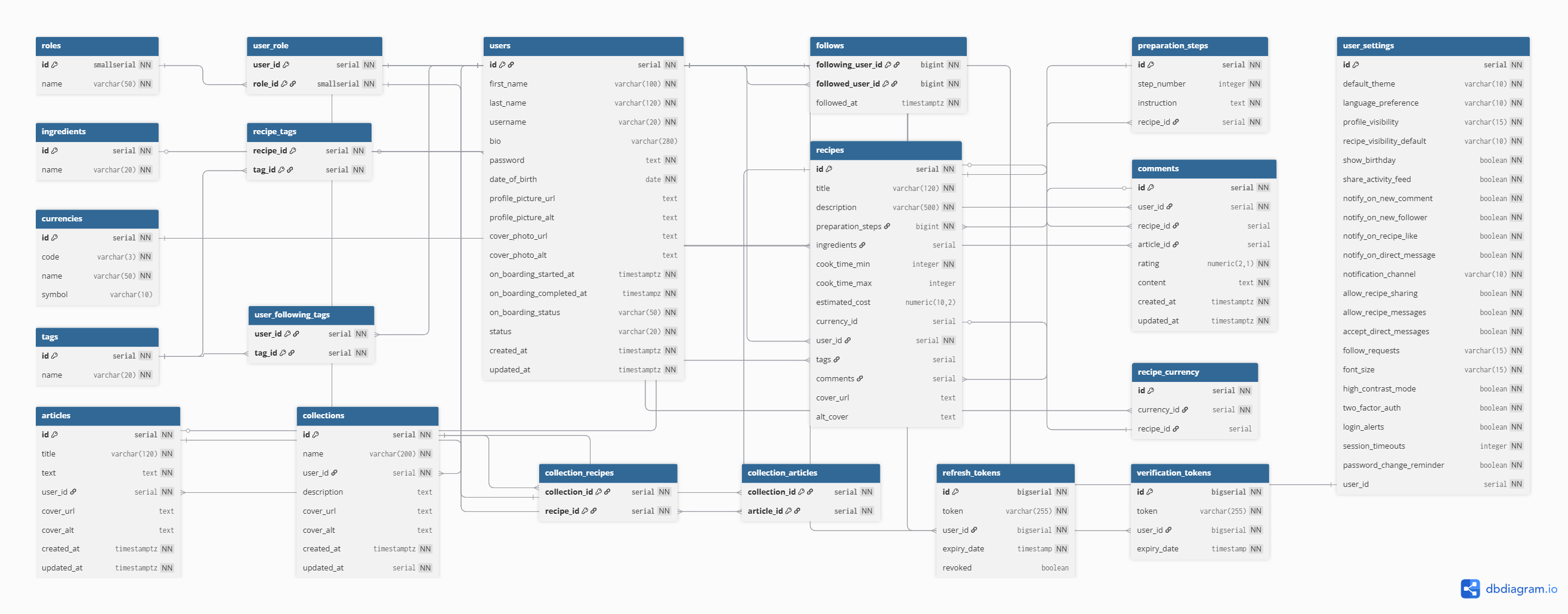
[img]
com.tastyhub
├── modules                    # Business modules organized by bounded context (modular monolith approach)
│   ├── auth
│   │   ├── application        # Application layer: orchestrates use cases and coordinates domain logic
│   │   │   ├── usecase        # Application use cases (command/query handlers implementing business flows)
│   │   │   ├── dto            # Data Transfer Objects used for input/output boundaries
│   │   │   └── mapper         # Mapping logic between Domain models and DTOs
│   │   │
│   │   ├── domain             # Core business logic and domain rules (framework-independent)
│   │   │   ├── annotations    # Custom domain-level annotations (e.g., business constraints)
│   │   │   ├── event          # Domain events representing significant business occurrences
│   │   │   ├── model          # Aggregates, Entities, Value Objects, and Enums
│   │   │   ├── repository     # Repository contracts (interfaces) defining persistence operations
│   │   │   ├── service        # Domain services containing complex business logic
│   │   │   └── policy         # Business policies and rule objects encapsulating decision logic
│   │   │
│   │   ├── infrastructure     # Technical implementations of external concerns
│   │   │   ├── aspect         # Cross-cutting concerns (AOP: logging, auditing, transactions)
│   │   │   ├── persistence    # Repository implementations, JPA mappings, database adapters
│   │   │   ├── security       # Security configurations and authentication providers
│   │   │   ├── messaging      # Kafka/RabbitMQ producers, consumers, and integration adapters
│   │   │   └── cache          # Redis integrations and caching strategies
│   │   │
│   │   └── interfaces         # Entry points into the application (delivery layer)
│   │       ├── controller     # REST controllers exposing HTTP endpoints
│   │       ├── websocket      # WebSocket endpoints for real-time communication
│   │       └── listener       # Event listeners (application or messaging-driven)
│   │
│   ├── user
│   ├── recipes
│   ├── articles
│   │   ...other modules
│   └── comments
│
└── shared
    ├── exception              # Global exception handling and base domain exception classes
    ├── dto                    # Shared DTOs used across modules (avoid overusing)
    ├── kernel                 # Core abstractions and base classes shared across the system
    └── config                 # Global technical configurations (Spring, security, serialization, etc.)
First, make sure that the Git CLI is properly installed on your machine.
If not, follow the official Git documentation (Git - Install) for installation and configuration, or download the project directly as a .zip file from GitHub.
With the Git CLI installed and configured, run the following command in your terminal to clone the repository:
git clone git@github.com:rodrigsmor/tastyhub-api.gitThen, navigate to the newly created directory:
cd tastyhub-api.env file and add the following variables (example):
SPRING_PROFILES_ACTIVE=     # Active profile (prod or dev)

# Image Viewing
API_UPLOAD_BASE_URL=        # Base Url of Images

# Database Configuration

DB_URL=                     # Database connection URL (e.g., jdbc:postgresql://localhost:5432/tastyhub)
DB_USERNAME=                # Database user credentials
DB_PASSWORD=                # Database password

# Spring Security

SPRING_SECURITY_USERNAME=   # (Optional) Basic Auth username
SPRING_SECURITY_PASSWORD=   # (Optional) Basic Auth password

# Postgres (Docker/Local Setup)

POSTGRES_DB=                # Name of the PostgreSQL database
POSTGRES_USER=              # PostgreSQL administrative user
POSTGRES_PASSWORD=          # PostgreSQL administrative password

# JWT Configuration

JWT_SECRET=                 # Secret key for signing tokens
JWT_EXPIRATION=             # Token expiration time (e.g., in milliseconds)
JWT_SECRET_KEY=             # Additional secret key or encoded string if required
JWT_ISSUER=                 # Registered claim identifying the token provider (e.g., tastyhub-api)
👉 Don’t forget to replace the values according to your context (username, password, database name, etc.).
From this point on, there are three main ways to run the project:
- 🐳 Using Docker Compose (highly recommended) to run all containers.
- 🐋 Using Standalone Docker only for the Spring project.
- 🔩 Hands-on running only the Spring Boot project (via IntelliJ or terminal).
Docker Compose is the most recommended approach, as it allows you to start all required services (Spring Boot, database, cache, etc.) with a single command.
-
Make sure Docker and Docker Compose are installed.
-
From the project root directory, run:
docker-compose up -d-
This will start all containers defined in the
docker-compose.ymlfile.- The Spring Boot service will be available at
http://localhost:8080. - The database (e.g., PostgreSQL) will be available on the configured port (e.g.,
5432).
- The Spring Boot service will be available at
-
To stop the containers:
docker-compose downIf you want to run only the Spring Boot container, without auxiliary services, you can use Docker directly.
-
Make sure Docker is installed.
-
Build the project JAR:
./gradlew build- Build the Docker image:
# Build the production image
docker build -t tastyhub-api .

# Build the development image
docker build -t tastyhub-api-dev -f Dockerfile.dev .- Run the container:
docker run -p 8080:8080 tastyhub-api- The application will be available at
http://localhost:8080.
Documentation UI will be available at http://localhost:8080/swagger-ui/index.html.
If you prefer to run only the Spring Boot project, without Docker, you can execute it directly in IntelliJ IDEA or via the terminal.
-
Using IntelliJ IDEA
- Open the project in IntelliJ.
- Locate the main class annotated with
@SpringBootApplication. - Click Run.
-
Using the terminal
- Run:
./gradlew bootRun- Or, if you prefer to build the JAR:
./gradlew build
java -jar build/libs/your-project-0.0.1-SNAPSHOT.jar- The application will be available at
http://localhost:8080.

🌐👨🏽💼 Developed with


Copyright © 2023 – 2026. Rodrigo Moreira da Silva
