
This is an imaginary website for a real estate company! Which can provide a wide range of properties and services.

Mockup vector created by rawpixel.com
The website features slideshows, testimonials, a page with all of the offers, and a contact page. The main goal of the website is to guide possible clients to making contact with the agency through the contact page.
The business goals of the website are:
- Get the Best Price for Your Property in the Shortest Time for the Lowest Fee.
- Pay a Fixed Fee & Keep Your Equity.
- Increase client base
The ideal clients for this business are:
- Everyone on this planet who wants to sell, buy, let or rent.
Client stories
- As a potential customer, I want to easily navigate throughout the site and find what I need.
- As a potential customer, I want to easily find the best price for the property, selling or buying.
- As a potential customer, If want to sell my property I want to know their charges and fees.
- As a possible customer, I want to know what former clients thought of their works.
- As an interested customer, I want to see wide range of services.
- As an interested customer, I want to easy navigate to contact/book page.
- As an interested customer, I want to calculate mortgage repayment and to know how to apply mortgages.
- As an interested customer, I want to find advice for buying.
- As an interested customer, I want to see their research of the market and their research team.
- As an interested customer, I want to see how to follow them on social media.
Wireframe mockups:
Wireframe information can be found in the separate Wireframe pdf file.
Each page has a responsive navigation bar with a Company Logo. Each page has a footer with copyright information company address, phone number, social links and links to navigate to another page.
Home page features:
The home page has an image carousel with a carousel text at the top. Information for the agency's services with a call to action buttons. A little info about the agency properties with a "Read More" call to action buttons. There is a Mortgage calculator where the customers can calculate their mortgage repayments with a "Request" button. There is a call to action button that takes the user to the Contact page.
Local Properties page features:
The page has a little information about the properties with a "View Property" call to action buttons. The page has a Overview of the Home Buying Process section with clickable call to action buttons.
Properties Abroad page features:
The page has a little information about the properties with a "View Property" call to action buttons. The page has a Overview of the Home Buying Process section with clickable call to action buttons.
Mortgage page features:
In the top section of the page has information and a "Contact us" call to action button. There is a Mortgage calculator where the customers can calculate their mortgage repayments. There are four section with advice and tips for the costumers and a "Contact us" call to action buttons.
Research page features:
Information about the market research and the company research Team.
Advice for buyers page features:
Informations, advices and tips for the buyers.
Request Valuation page features:
Information and tips about selling a property. A contact form and an information about the agency's Valuation Team.
Contact page features:
Information and a contact/feedback form.
- Every page has Header Logo - Clicking the logo returns users to the home page.
- Every page has a Footer - The navigation links, information about the company address, social icons.
- Every page has Footer Copyright Info - Business copyright.
- Every page has a Call to Action Button - Allows users to contact the agency.
- Every page has a Back to top Button - Clicking the button takes the user back to the top.
- The project uses HTML and CSS and Javascript programming languages.
- Visual Studio Code The developer used Visual Studio Code to build this website.
- Bootstrap The project was build with Bootstrap4.6.
- EmailJS This project use EmailJs to send email directly from Javascript.
- SwiperJs The project use SwiperJs
- ScrollReveal
Testing information can be found in separate Testing.md file.
This project was developed Visual Studio Code using git and pushed to GitHub using the built-in function within Visual Studio Code. Deploy this project
-
First you need a valid GitHub accont and you need a project to deploy a static website. How to create a GitHub accont find more here
-
Go to GitHub and sign in with your credentials.
-
Create a new repository by clicking a Start a project button or you can click the green button with New in it.

-
Give name to the Repository.

-
Your repo is created. There are three ways to upload Html code. Follow the one you would like to push your code into GitHub.

-
Make sure you have git install in your system. How to install Git you can find more here.
Follow the instructions and push your code into origin main branch.
-
Ones you have transferred all the files on your GitHub repository from the menu select Settings
-
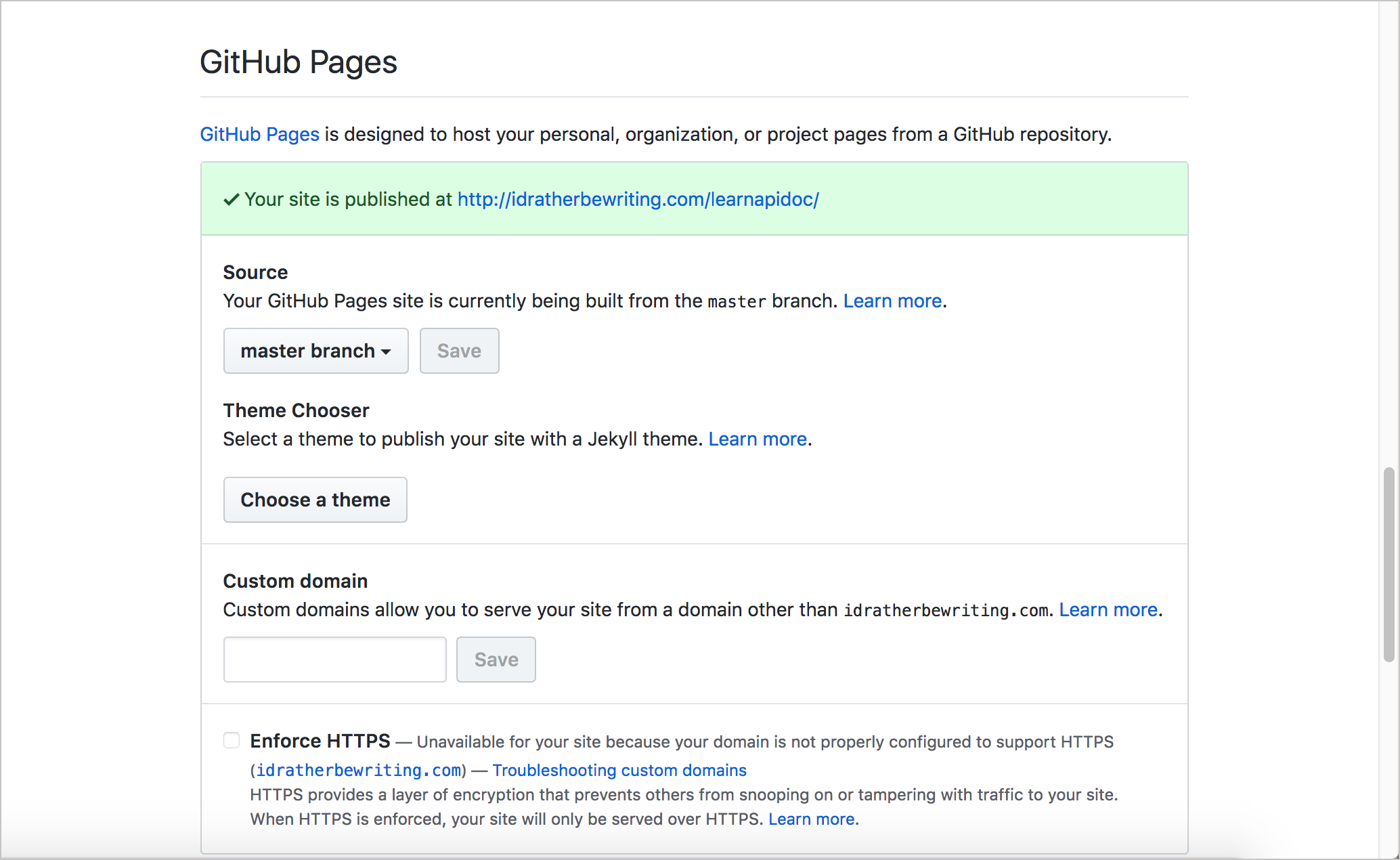
Scroll down to the GitHub Pages section.
-
Under Source click the drop-down menu -by default is labeled None- and select Main/Master branch and click the Save button. Ones you clicked on the save button you will be able to see this message -Your site is published at this url http://username.io/repository-name/
-
You can click on it and it will open in a new tab. Your website is live in this url http://username.io/repository-name/. The website is now deployed.


To clone this project into Gitpod you will need:
- A Github account. Create here
- Chrome or Firefox browser.
- Install the Chrome or Firefox gitpod Extension
- Log into GitHub with your github account.
- Navigate to the Project Repository
- The "Gitpod" button is in the top right corner of the repository now.
- Click on the "Gitpod" button that will open a gitpod workspace where you can work locally with the code.

To work on the project within a local system such as VSCode etc:
-
Navigate to the Project Repository
-
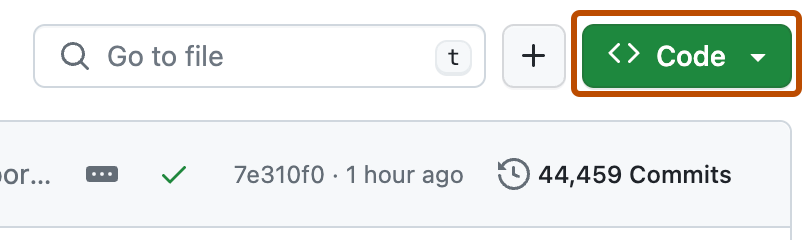
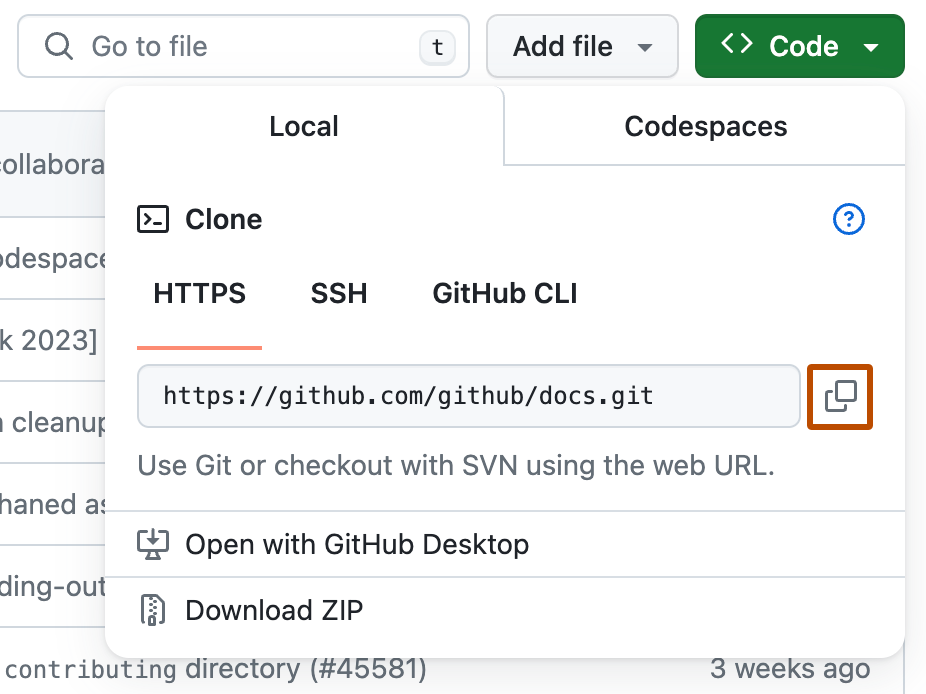
Click on the Code button (next to the green Gitpod button) and choose to Clone or Download zip file.
-
If you choose clone in the HTTPs section copy the URL for the repository.
-
In your local system open the terminal.
-
Change the working directory to the location where you want the clone the repository.
-
Type
git clone, and then paste the URL you copied earlier.$ git clone https://github.com/YOUR-USERNAME/YOUR-REPOSITORY -
Press Enter to create your local clone.
If you have any trouble cloning the repository further information can be found here